


Imagine it's your very first night in China: you're excited to dig into dinner, but the menu is a wall of Chinese characters and your trusty translation app back home suddenly won't load. We've all been there! That exact moment of helplessness is why we put together this guide. To help you feel confident and right at home, we've tested and organized the absolute best translation apps for China based on how they actually work on the ground.
Baidu Translate is the best translation app for China for everyday use, because it works on Chinese networks without a VPN and covers text, voice and camera. Microsoft Translator is a solid second, and Google Translate in China works best as an offline backup unless your data routes outside the country. China's rules shift often, so test your setup once more before you fly.
The rest is organized around real situations: menus, taxis, chat messages and a few phrases worth saving, plus a pre-flight checklist for your trip to mainland China. If you're still choosing cities, start with our China places to go guide.
Best translation app for China: the quick comparison
Here's how the main contenders for the best translation app for China stack up. The table answers three questions: does it load without a VPN, does it work offline, and which modes does it handle?
App | Works in China without a VPN? | Offline | Text | Voice | Camera | Conversation |
|---|---|---|---|---|---|---|
Baidu Translate | Yes | Text packs; camera offline is limited | Yes | Yes | Yes | Yes |
Microsoft Translator | Yes, per current reports | Text packs | Yes | Yes | Yes | Split-screen view; group chat ended June 30, 2026 |
Google Translate | Online access is unreliable; works if your data routes outside China | Text pack; test camera before you fly | Yes | Yes, online | Yes | Yes, online |
WeChat translate | Yes, built into WeChat | No | Chat messages | No | Photos and some menus | No |
Pleco dictionary | Yes, works offline | Full dictionary | Word lookup | No | Paid add-on | No |
Waygo | Yes, works offline | Yes | No | No | Yes | No |
Voice and camera usually need a connection, so offline mode is a text-first safety net. Google ended its mainland China service in 2022, and reports still conflict on newer app versions loading without a VPN. Treat online Google Translate as unreliable unless your data routes outside China, as it does with a China eSIM.
Reading menus and signs: the best camera translation app
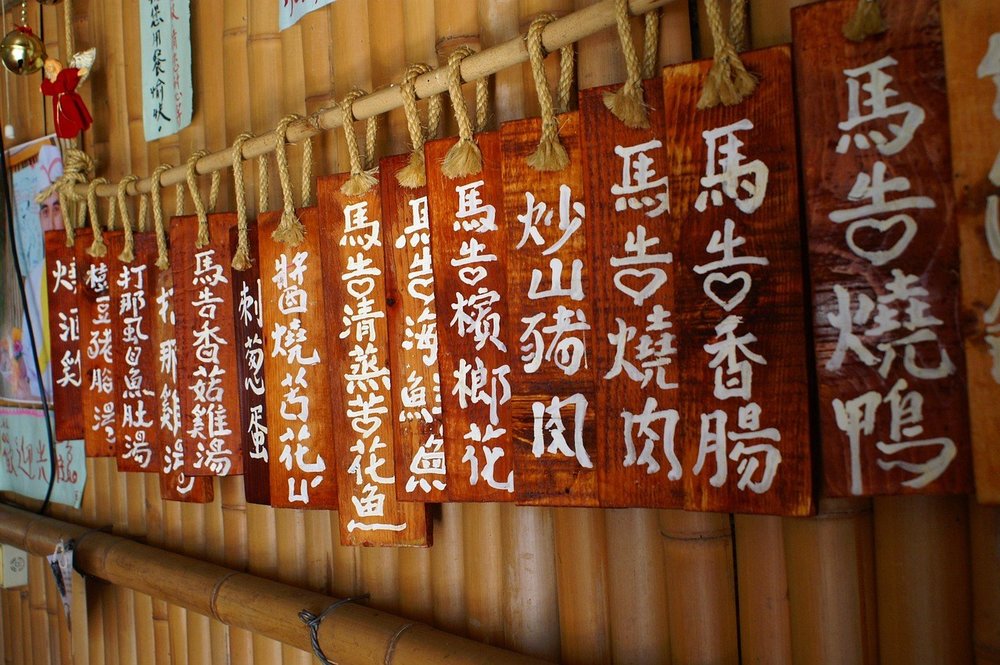
Traditional wooden menu boards with handwritten Chinese text | Image credit: liuchienchung via Pixabay
A menu with 40 dishes and no photos is where camera translation earns its keep. Open Baidu Translate, tap the camera tab (拍照), and hold your phone over one column at a time. Cropping tight gives cleaner results than scanning a full spread with prices scattered across it. Microsoft Translator and Google Translate also have camera modes if you want a second opinion.
Expect literal results. Mǎyǐ shàng shù comes out as "ants climbing a tree," which is really glass noodles with minced pork, so treat the overlay as a strong hint rather than the final word.
The Temple of Heaven is a good place to practice, since English signage there is limited and the Chinese plaques carry most of the history. For one baffling word, the Pleco dictionary's camera reader (a paid add-on) shows what each character means.
Even in a basement or off the grid, Waygo reads written Chinese through your camera with no connection at all. It won't handle conversation, but it's handy for labels and street signs.
Klook Tip: Test your camera app in airplane mode at home. If the overlay still appears, you've got a real offline backup.
Talking to taxi drivers and hotel staff: voice and conversation mode
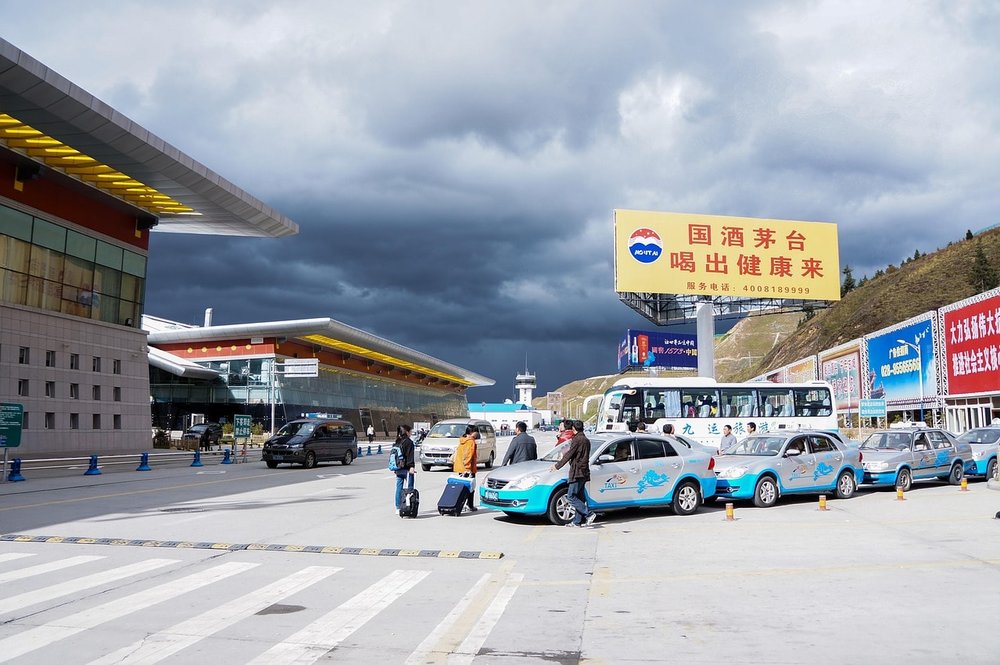
Taxi stand in Jiuzhaigou, China | Image credit: Pixabay
Rush hour at a taxi stand is the worst time to find out your app can't hear you. A good voice translator app needs a quiet spot and one short sentence at a time. Baidu Translate's conversation tab (对话) listens in one language and speaks in the other, which suits quick questions like "Can I leave my bags here?"
Microsoft Translator's split-screen view works across a hotel counter, and your typed text can flip upside down so the other person reads it easily. Its multi-device group chat was retired on June 30, 2026, so don't plan around it. Voice translation generally needs a connection, which makes it the first thing to fail in a tunnel or basement.
The most reliable trick is not speaking at all. Show written Chinese instead, and book rides in DiDi, where you set the destination in English or Chinese and the in-app chat translates messages for your driver. If the standalone app gives you trouble, you can book DiDi from inside WeChat or Alipay.
The Summer Palace has several entrances, so save the exact gate name before you get in a car. 颐和园东宫门 is the East Palace Gate.
Klook Tip: Screenshot your hotel's name and address in Chinese before you fly, and add 请带我去这个地址 (please take me to this address) underneath. Show it to your driver or front desk instead of speaking.
When an app isn't enough: private guides

Kunming Lake, Beijing | Image credit: Lancier via Pixabay
Some days you'd rather not manage a single app. These three tours put a bilingual guide between you and every menu, ticket line and driver.
Beijing custom full-day tour
The Beijing private guided tour starts at USD 96.95 as listed on November 26, 2026, with 4-hour and 8-hour options and a vehicle you can add. It suits you if you're solo or traveling with family and want one English-speaking person to handle drivers and menus, and routes include the Temple of Heaven or a full Summer Palace day. The catch is that you travel to the meeting point yourself.
3-day private Beijing tour
The 3-day private Beijing tour was listed at USD 1,037.55 on November 26, 2026, with a Mandarin and English guide, a driver and hotel pickup. It suits first-timers and families who want zero logistics, and it covers the Forbidden City, the Great Wall and the Temple of Heaven, plus a Summer Palace afternoon on day three.
The price changes with the hotel package you pick, and one reviewer said a listed stop was swapped out, so confirm the plan with your guide early.
Shanghai private day tour
The Shanghai private day tour starts at USD 76.95 for about eight hours, with free pickup from hotels in central districts. It suits a first look at Lujiazui, the Bund and Yu Garden in a single day without navigating alone.
Yu Garden closes on Mondays, so the guide swaps in the City God Temple, and going past eight hours means an overtime fee. Your guide's contact details arrive by WeChat or WhatsApp the day before, so register for WeChat ahead of time.
Reading chat messages: WeChat translate and in-app tools
Your hotel, your guide and your driver will probably message you on WeChat, and none of them will wait while you hunt for a translate button. Long-press any message and tap Translate, and WeChat translate converts it into your app's interface language. You can also switch on automatic translation for a chat, then long-press a translated message to change the language.
Restaurant tables help too. Scan the table QR code with WeChat's own scanner, not your phone's camera app, and the digital menu opens with the same built-in translation. It isn't 100% accurate, but you'll know roughly what you're ordering. For payments, maps and the rest of your China travel apps, our useful apps for China guide has the full list.
Learning key phrases: the Pleco dictionary and five lines worth saving
Five phrases change the mood of a taxi ride more than any app does. The Pleco dictionary is the best place to learn them, because the free version works fully offline with no signal needed. The camera reader and a few other features are paid add-ons, so decide before you fly.
Install it at home, since app stores can be harder to reach once you land. Android users can also download Pleco directly from pleco.com/getandroid. Beyond Beijing and Shanghai, English thins out quickly, and at the Chengdu panda base a driver will want the full Chinese name, 成都大熊猫繁育研究基地, not a description.
Save these five on your phone:
- 请带我去这个地址 (qǐng dài wǒ qù zhège dìzhǐ): Please take me to this address.
- 请打表 (qǐng dǎ biǎo): Please use the meter.
- 这个多少钱? (zhège duōshao qián): How much is this?
- 我不吃辣 (wǒ bù chī là): I don't eat spicy food.
- 不要香菜 (bú yào xiāngcài): No cilantro, please.
Set up before you fly: your translation checklist
Most translation problems in China start at home, with an app you meant to download and never did. Even the best translation app for China needs a little preparation, because app stores and some services can be harder to reach once you land. Work through these four steps a week before departure.
Apps and offline packs
Install two translators and WeChat. Baidu Translate plus Microsoft Translator is a sensible pair, and Pleco is worth adding if you want the dictionary. Download the Simplified Chinese offline pack in each, on home Wi-Fi rather than airport Wi-Fi. Then switch to airplane mode and test text translation, so you know your backup works before you need it.
Data: a China eSIM
Translation apps work best with a steady connection, so data matters as much as the app. Klook's China eSIM was listed from USD 2.09 on November 26, 2026, with plans from 500MB to unlimited and validity of 1 to 30 days. Its data routes through an international network, so Google, WhatsApp and Instagram load without a VPN, according to the product page.
It's data only, so keep your home SIM for calls and texts. Install the eSIM before you fly and keep it switched off until you land, because validity starts when it connects. A few reviewers mention weak signal in remote or mountain areas, which is one more reason to keep those offline packs.
Entry and payments
The digital arrival card has been available since November 20, 2025, and is free on the official National Immigration Administration channels. Our China arrival card guide walks you through it, and our Alipay guide covers sign-up, passport verification and linking a card. Finish both before you board and your first hour in China gets much calmer.
Airport, trains and power
Beijing is the usual first stop, and a Beijing airport transfer solves the first translation test of the trip. Prices start at USD 21 for central areas like Wangfujing, Qianmen and Chaoyang, and your driver meets you at arrivals with a personalized sign.
Show them your hotel address in Chinese anyway. If you're starting in Beijing, that one screenshot does most of the work.
Klook Tip: Enter your flight number and arrival time when you book your transfer, so the driver knows when to expect you.
High-speed rail needs less talking when you book ahead, and our China train tickets guide shows how. Camera translation drains your battery, so pack a power bank and check our China power plug guide for adapters.
FAQs about the best translation app for China
What is the best translation app for China?
Baidu Translate is the best translation app for China for most trips, because it works on Chinese networks without a VPN and handles text, voice, camera and conversation. Pair it with Microsoft Translator as a backup, plus a downloaded offline pack as a safety net. Spend ten minutes at home opening the camera and conversation tabs, since the app can feel Chinese-first at launch.
Does Google Translate work in China?
Google Translate in China is unreliable online, so don't count on it. Google ended its mainland China service in 2022, and as of November 26, 2026, sources still disagree about newer app versions loading on Chinese networks without a VPN. It works when your data routes outside China, such as through a China eSIM, and its downloaded offline pack handles text without a signal.
What is the best offline translation app for China?
Microsoft Translator and Baidu Translate both offer downloadable offline packs, and Pleco is the strongest offline dictionary. Offline mode is mostly text, so camera and voice results can be limited without a signal. Download the Simplified Chinese pack at home on Wi-Fi, then test it in airplane mode before you fly.
Which translation app can read Chinese menus with the camera?
Baidu Translate's camera tab is the one to start with, and Microsoft Translator and Google Translate offer camera modes too. Hold your phone over one column of the menu at a time for cleaner results. Translations can come out literal, so treat dish names as a strong hint and ask your server if something sounds odd.
Do I need a VPN to use translation apps in China?
No, not for Baidu Translate, Microsoft Translator, Pleco or WeChat, which are reported to work on Chinese networks. Google's online services are the exception. VPN services that aren't officially approved are restricted in China, so check current guidance before you rely on one, or use an eSIM that routes data abroad instead.
What is the best way to talk to a taxi driver in China?
Show the address in Chinese instead of speaking it. Screenshot your hotel's name and address before you fly, or book through DiDi, where you set the destination in English or Chinese. Keep 请打表 (please use the meter) handy for street taxis.
Can I use a translation app without internet in China?
Yes, for text. Download the Simplified Chinese pack in Baidu Translate, Microsoft Translator or Google Translate, and use Pleco or Waygo for offline lookups. Voice and conversation modes generally need a signal, which is why an eSIM is worth having.
Order that first plate with confidence
Before your next coffee, download Baidu Translate and its Simplified Chinese pack, then screenshot your hotel address in Chinese. On your first evening in Beijing, you'll point your camera at a noodle menu, spot the dish you wanted, and order it with a grin instead of a guess.
More China travel guides for you



What is Klook?
Klook is a leading pan-regional experiences platform in Asia Pacific, purpose built to digitalize experiences and make them accessible to every traveler.
Our mission is to build the digital infrastructure for the global experience economy — empowering merchants to share their passions and travelers to discover the heartbeat of each destination. We operate a mobile-first, curated platform featuring diverse experiences across global destinations.