


If you've already downloaded Amap for your China trip, the next question is simple: how to use Amap once you're standing, let's say, on a street corner in Shanghai with no idea which way is north. This guide covers the actual mechanics: getting directions, switching the app to English, booking a ride, and riding the metro without guessing at characters you can't read.
Your first stop might be The Bund or a quieter neighborhood, and the app works the same way either time. Once you know how to use Amap for one route, you know how to use it for all of them.
The basics of how to use Amap
Amap (also called Gaode Map) is China's most reliable navigation app, and it's the one local drivers, delivery riders, and ride-hailing platforms actually run on. Google Maps doesn't have reliable data inside Mainland China, so Amap fills that gap for driving directions, walking routes, transit planning, and ride-hailing in one place.
Before your trip, open the app's settings menu and switch the display language to English. This won't translate every street name on the map itself, but it changes menus, buttons, and most search results into English, which makes the rest of this guide much easier to follow. For more details on how to change the language to English, refer to our Amap guide.
Amap directions guide: turn-by-turn directions
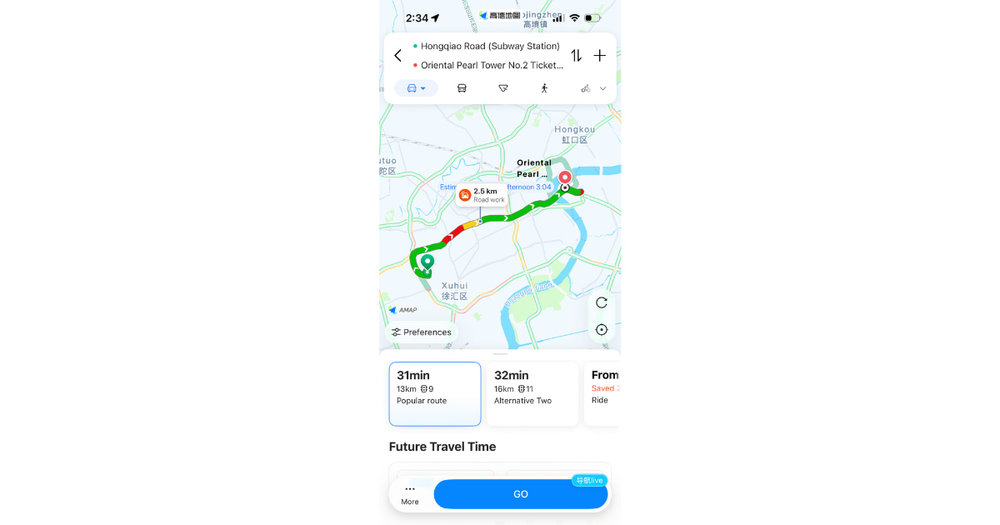
Amap gives turn-by-turn directions
Once your language is set, getting from A to B is the easy part. Tap the search bar at the top of the screen and type in your destination, an address, or a landmark name such as Oriental Pearl TV Tower. Amap will show a pin on the map along with a route button underneath.
Select your mode: walking, driving, cycling, or transit. Amap turn by turn directions appear as a highlighted path on the map with distance, estimated time, and step-by-step instructions listed below it. Tap the green "start" button and the app switches into navigation mode, updating your position as you move and calling out the next turn.
One quirk worth knowing: search results sometimes show the Chinese name first, even in English mode. If you're not sure which result matches your destination, cross-check the address or tap into the listing to see photos before you start navigating.
Klook Tip: Screenshot your route before you leave your hotel Wi-Fi. If your data connection drops underground or between buildings, you'll still have the turns saved on your screen.
Amap voice navigation in English
Typing directions is fine for planning, but once you're walking or in a taxi, you want turn calls read out loud instead of glancing at your phone. Amap voice navigation English support is available, though it's tucked a layer deeper than the main settings menu.
Inside the app, go to your profile, then find the navigation or voice settings, and select an English voice pack from the list. Some voice packs need to download the first time you pick them, so do this before you're relying on it mid-route. Once it's set, every route you start will read directions aloud in English rather than Mandarin.
If the voice switches back to Mandarin after an app update, it usually means the setting reset and needs to be reselected. It's a minor annoyance, but a quick fix once you know where to look.
How to book a ride: Amap ride-hailing in English
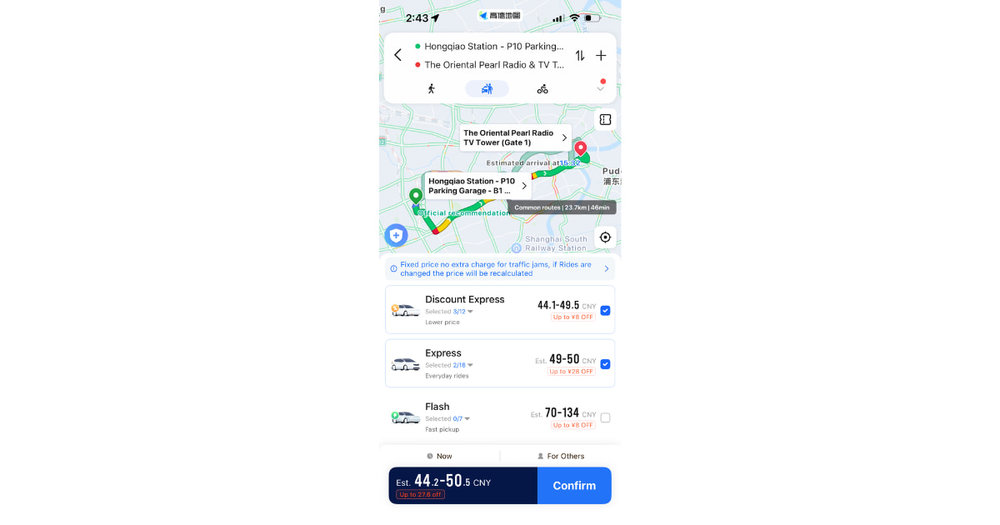
You can use Amap as a ride-hailing hub
Amap doubles as a ride-hailing hub, pulling in drivers from several platforms rather than running its own separate fleet. That's genuinely useful, since you're not stuck depending on one app having available cars in your area.
To book, tap the car icon on the main screen, then enter your pickup point and destination the same way you would for directions. Amap's ride-hailing shows fare estimates from multiple providers side by side before you confirm, so you can pick the cheapest or fastest option. Payment usually links back to a connected wallet or card, so it's worth setting that up before you actually need a ride.
Drivers see your destination as a pin, not written instructions, which sidesteps the usual problem of not being able to say an address out loud. Amap ride hailing English support means the driver already knows exactly where you're headed, which makes it a solid backup for late-night trips or when you'd rather not deal with a taxi stand, especially near a spot like Yu Garden after dark.
For airport routes specifically, a pre-booked option can be more predictable than hailing on the spot. Private Shanghai airport transfers skip the fare-matching step entirely since the price and pickup point are fixed in advance.
Amap for public transport in China
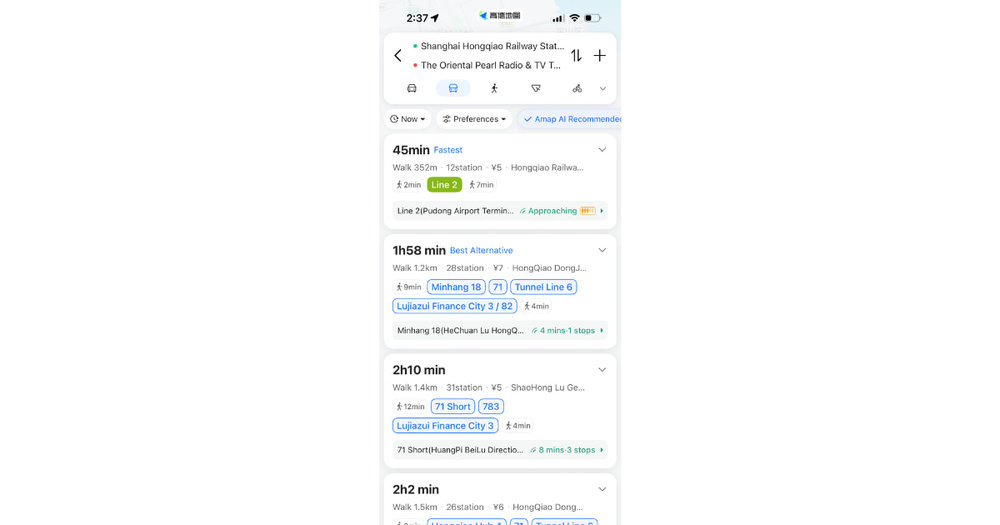
You can use Amap for figuring out public transport routes in China
Metro and bus routing is where Amap earns its keep if you'd rather skip taxis altogether. Search your destination as usual, tap the transit icon, and the app lays out every option: which line to take, which exit to use, how many stops, and how long the walk to the platform will be.
Amap public transport China routing also flags transfers between metro lines and tells you which exit number to look for at street level, which matters in stations with a dozen exits leading to completely different blocks. If a bus route is faster than the metro for a short hop, Amap will suggest that instead, complete with the bus number and the stop name.
A rechargeable transit card removes the friction of buying single tickets at a machine every time. A bus and metro card works across most cities in China, and it pairs naturally with Amap's route planning since you'll already know which line and stop to head for.
Klook Tip: Amap shows real-time train arrival estimates for many metro lines. If you're cutting it close, check the countdown before committing to a transfer.
For Shanghai specifically, Amap will also route you toward the Maglev train metro pass option when your trip involves Pudong airport, since the maglev line shows up as a transit option alongside the regular metro.
FAQs about how to use Amap
How do you get directions on Amap?
Type your destination into the search bar, select it from the results, then choose your travel mode (walking, driving, or transit) and tap the route button. Amap displays turn-by-turn directions on the map and can read them aloud if you start navigation mode.
Can Amap be used in English for navigation?
Yes. Switch the display language to English in the app's settings before your trip. Menus, search results, and turn-by-turn instructions will appear in English, and you can also select an English voice pack for spoken directions.
How do I book a ride through Amap?
Tap the car icon on the home screen, enter your pickup location and destination, and Amap will show fare estimates from several ride-hailing providers. Confirm the option you want and a driver will be matched to your pinned destination.
Can I use Amap on public transport in China?
Yes. Select the transit icon after entering your destination, and Amap will lay out metro lines, transfers, exit numbers, and bus routes, along with estimated travel time for each option.
Related Articles



What is Klook?
Klook is a leading pan-regional experiences platform in Asia Pacific, purpose built to digitalize experiences and make them accessible to every traveler.
Our mission is to build the digital infrastructure for the global experience economy — empowering merchants to share their passions and travelers to discover the heartbeat of each destination. We operate a mobile-first, curated platform featuring diverse experiences across global destinations.