


If you've ever tried to open Google Maps in Beijing or Shanghai and watched it spin forever, you already know the problem. Google's services are blocked in Mainland China, which means the map app you rely on everywhere else in the world simply won't work here.
That's where Amap comes in. It's the map app that over a billion people in China actually use, and it's a lot more capable than you would expect. This guide covers what Amap is, what it costs, how to sign up without a Chinese phone number, how to switch it to English, and how it stacks up against Google Maps for tourists.
Why doesn't Google Maps work in mainland China?
Google Maps, along with Gmail, Google Search, and most other Google products, has been blocked in mainland China since 2014. You might still be able to open the app if you have a VPN running, but the map data itself is often outdated or missing small roads, newer subway lines, and local points of interest.
That's a real problem when you're trying to find your hotel down a side street or figure out which exit to take at a massive subway station. Locals stopped relying on Google Maps years ago, which is exactly why Amap became the default instead.
What is Amap?
Amap, known as Gaode Ditu (高德地图) in Chinese, is China's most widely used navigation and maps app. It's owned by Alibaba and handles a lot more than basic directions: walking routes, public transit, ride-hailing, bike-share unlocking, and restaurant reviews are all built in.
Unlike Google Maps, Amap has full, constantly updated coverage inside China: every subway exit, every back alley, and real-time traffic and transit data pulled straight from local sources. For a first-time visitor, it's less of an alternative and more of a replacement for whatever map app you're used to.
Is Amap free to use?
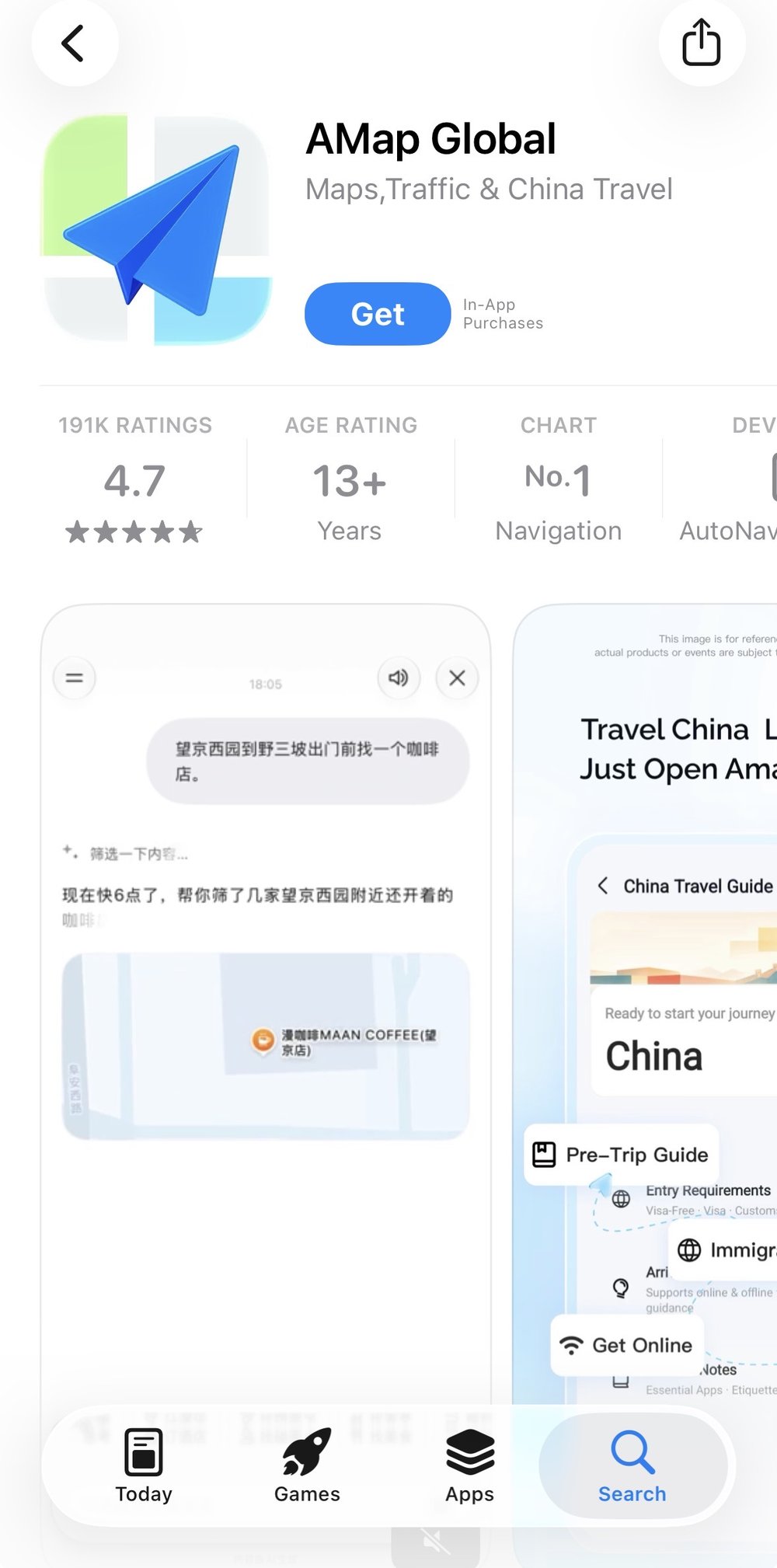
Amap is free to download
Yes, Amap is completely free to download and use. There's no subscription, and none of the core features tourists actually need, like walking directions, transit routes, or offline maps, sit behind a paywall.
You will need a data connection to load new areas or search for places, so it's worth sorting out mobile data before you land. A China eSIM with high-speed internet is one of the easiest ways to get online the moment you arrive, since you can activate it before your flight even lands.
How to sign up for Amap without a Chinese phone number
A common question before the trip: can you sign up for Amap without a Chinese phone number? Yes. The app has a guest mode that lets you browse and navigate without creating an account at all, which is the fastest option for most short-term visitors.
To use guest mode, download Amap from the App Store or Google Play, open it, and skip past the login screen when prompted. You'll be dropped straight into the map. Search, directions, and transit routes all work fine without signing in.
If you want to save favorite locations or sync data across devices, you can register with an email address instead of a phone number. Look for the email sign-up option on the login screen rather than the default phone number field.
How to turn on Amap English mode
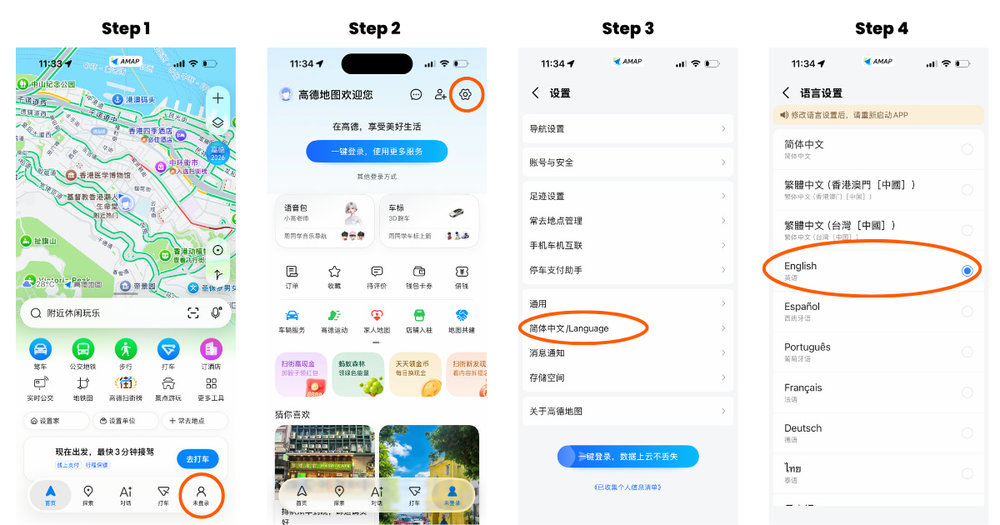
Step-by-Step instructions for turning on Amap English mode
Amap ships in Chinese by default, but switching on Amap English mode only takes a minute.
- When you open the app, it opens on the Home page. Tap the profile icon (the outline of a person).
- Tap the Settings cogwheel in the top-right corner.
- Scroll down to Language.
- Select English. Restart the app manually to apply changes.
You'll then see translated menus, search results, and most place names. Some smaller local businesses may still appear in Chinese characters only. This is normal, as not every business has an official English name.
Klook Tip: Even in English mode, it helps to have the Chinese name of your destination saved as a screenshot or note. Showing it to a taxi driver or asking a local for directions is often faster than trying to explain the English name.
Amap vs Google Maps: which should tourists use?
For travel inside mainland China, Amap wins on almost every practical measure. Its transit data is current, its walking directions account for pedestrian-only streets and underground passages, and it works without a VPN. Google Maps, by comparison, is often unreliable or completely inaccessible once you land.
That said, Google Maps still has its place. Use it to plan your trip before you leave home, since it's easier to search in your own language, and switch to Amap once you're on the ground. Some travelers use both apps side by side: Google Maps for general orientation and Amap for step-by-step directions and transit.
How to download an Amap offline map
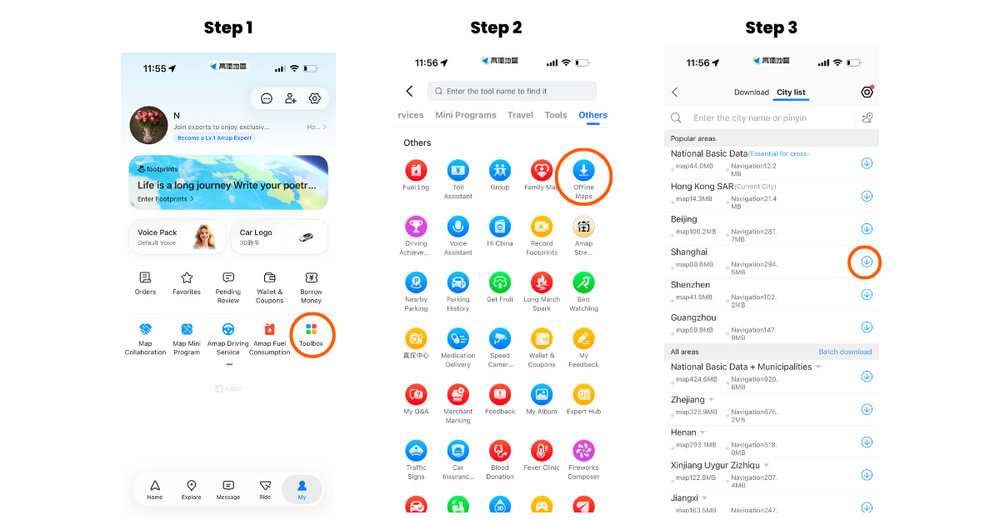
Step by step instructions on how to download an Amap offline map
Amap lets you save an offline map of an entire city, which is worth doing before you head into areas with spotty signal, like subway platforms or rural sections of the Great Wall.
To download an offline map, go to your Profile and scroll through the horizontal menu until you find Toolbox.
You'll see a list of tools, services, and programs available in the app. Scroll down to the Others section and select Offline Maps.
From there, you can either browse the City list to find and download a map by clicking the down arrow, or use the search bar to search for your preferred area or city.
Important: You must be logged in to your account to access offline maps. If you don't have an account, the Offline Maps option will not appear in the app.
Amap for tourists: putting it to the test in Beijing
Beijing is a good place to see why Amap matters. The city's biggest attractions sprawl across huge grounds with multiple gates, and getting the entrance wrong can cost you half an hour of walking.
At the Forbidden City, Amap will point you to the correct entrance gate and the nearest subway exit, which matters given how large the complex is. It's easy to pair with a visit to Tiananmen Square next door, since most first-time visitors tackle both in a single morning.
For a day trip out to the Mutianyu Great Wall, offline maps are especially useful. Signal can drop once you're outside the city center, so having the route saved ahead of time means you won't lose your way back to the bus or car pickup point.
Stay connected in China: essentials to pair with Amap
Amap only works as well as your internet connection, so it's worth sorting out data and transport before you land. Besides the eSIM option mentioned earlier, a 4G WiFi device for China is a solid choice if you're traveling with a group and want to share one connection across multiple phones.
If your trip includes high-speed rail between cities, Amap is also handy for navigating sprawling stations like Beijing South or Shanghai Hongqiao. A pass to the Beijing South rail lounge or the Shanghai Hongqiao rail lounge gives you a quiet spot to wait and double-check your route before boarding.
FAQs about Amap
Is there an English version of Amap?
Yes. Amap has a built-in English mode that you can turn on from the app's Settings menu under Language. It translates most menus, search results, and directions, though some small local listings may still appear in Chinese since they don't have an official English name.
Does Google Maps work in mainland China?
Not reliably. Google's services, including Google Maps, are blocked in mainland China, and even with a VPN, the map data tends to be outdated or missing local details. Most travelers switch to Amap once they arrive for this reason.
Can I use Amap without a Chinese phone number?
Yes. Amap has a guest mode that lets you search and navigate without creating an account or entering a phone number at all. If you want to save favorites or sync your account, you can sign up with an email address instead.
Is Amap free to use?
Amap is completely free, with no subscription or paywall on core features like directions, transit routes, and offline maps. You'll just need a data connection to search for new places, so it's worth arranging a SIM or WiFi device before you arrive.
What's the best navigation app for foreign tourists in China?
Amap is generally the best option once you're in mainland China, thanks to its accurate, constantly updated local data and English mode. Many travelers still use Google Maps to plan their trip beforehand, then switch to Amap for actual navigation on the ground.
Ready to explore China?
Amap takes the guesswork out of getting around China. It'll help you track down the right gate at the Forbidden City, catch a train out of Beijing South without missing it, or just find your way back to the hotel. Set it up before you land, download an offline map or two, and make sure your eSIM or WiFi device is active the moment you touch down. Sort out your connectivity now, and you'll spend a lot less time lost and a lot more time exploring.
More China travel guides for you



What is Klook?
Klook is a leading pan-regional experiences platform in Asia Pacific, purpose built to digitalize experiences and make them accessible to every traveler.
Our mission is to build the digital infrastructure for the global experience economy — empowering merchants to share their passions and travelers to discover the heartbeat of each destination. We operate a mobile-first, curated platform featuring diverse experiences across global destinations.