

The Klook affiliate program is a good option for online content producers who want to expand their reach and income options. As a Klook affiliate, you can direct some of your website traffic to Klook by using a personalized link or a CTA button. By doing so, you will earn commissions.
The Affiliate portal gives you access to a dashboard where you can track the performance of your page, so you know which of your efforts have been the most successful. Here are some ways to keep track of your affiliate performance on Klook.
What are the different ways to track your performance?
To analyze the performance of the redirected traffic from your blog, log in at affiliate.klook.com then go to Performance. There are many important metrics in Klook Affiliate to track your content’s potential under the performance report.
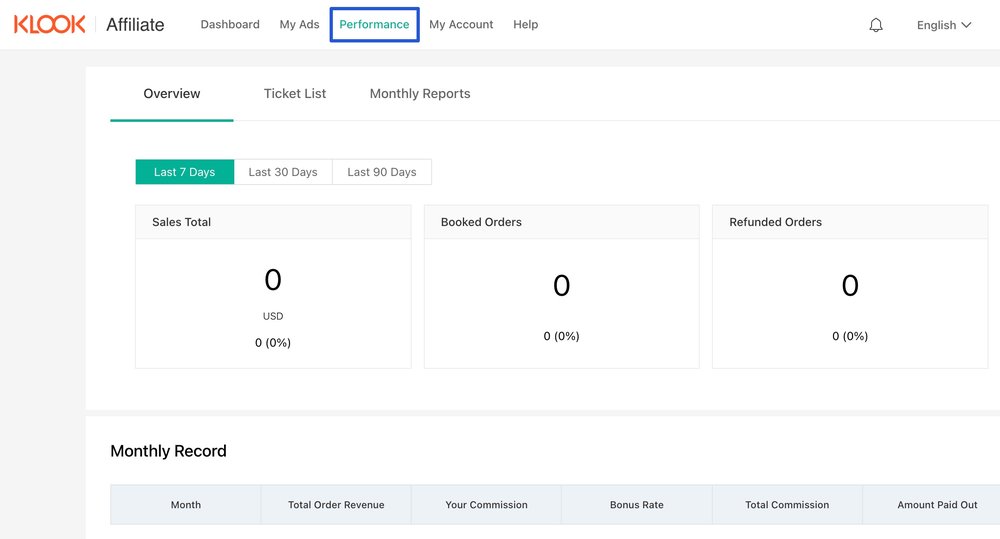
Keeping track of your commissions
Let’s say you have several readers of your blog who booked tours through the CTA button in your content. The successful bookings are the ones where you have the highest sales commission. You can access the affiliate performance dashboard to analyze your monthly commission and identify key opportunities to attract new customers.
The Ticket List shows the activity breakdown from an order. Customers may purchase multiple activities in one order.
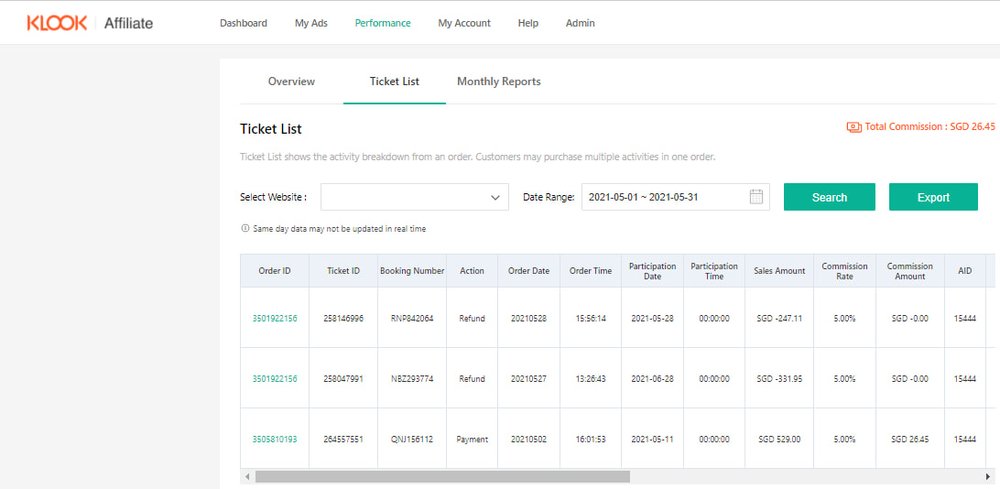
A detailed view of each transaction is available in the Ticket List section. There’s no denying that bookings are an important metric for determining the success of an affiliate program.
But while they’re one indicator of performance, bookings alone won’t give you enough information to make significant improvements to your content strategy. Instead, bookings should be analyzed alongside a more important metric that’s key to getting on the good side of your page views and booking: Sales amount and the date it was purchased.
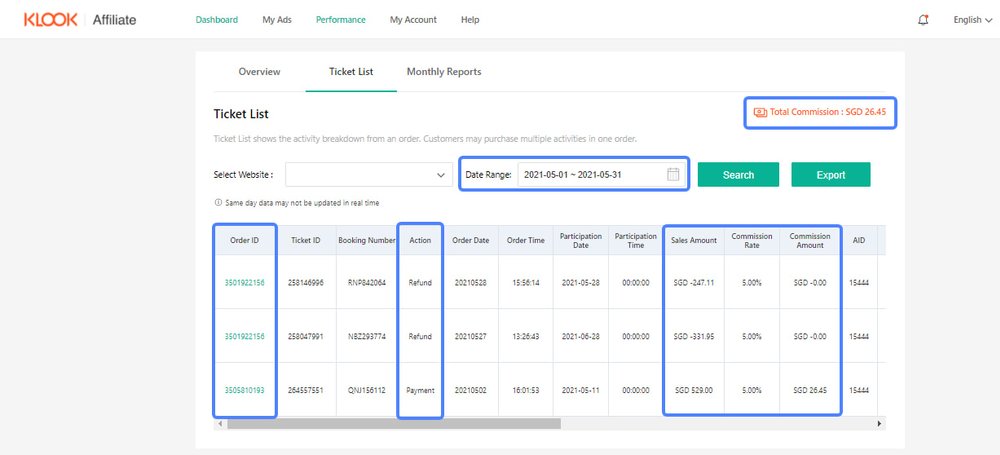
From a marketing perspective, sales, or the estimated total commission earned from linking your content to Klook, is more important than a raw page visit. The updated Performance dashboard makes this clear by dedicating an entire section to this new, more telling metric of your content’s huge potential.
If you find that your page visits and commissions are low, consider going back to the drawing board and creating more engaging content for your audience.
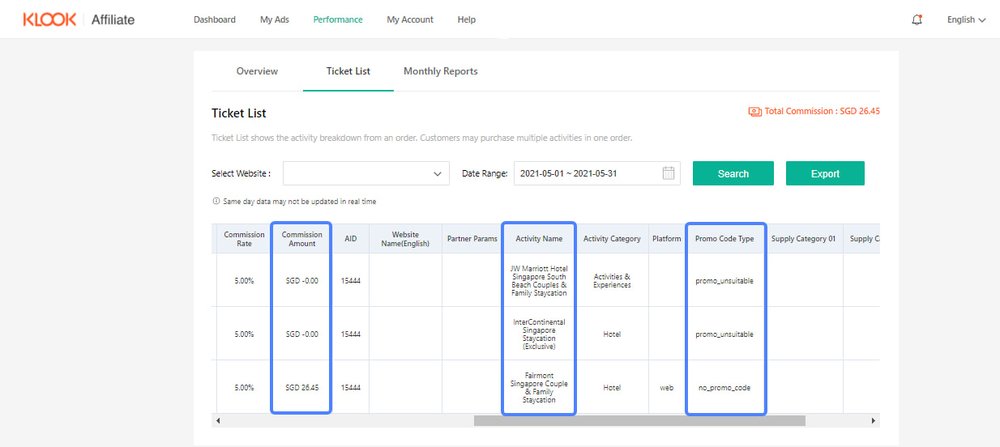
You can check the order details just by selecting a period on the ticket list and see which activities your readers have booked. You can also view the commissions you’ve earned from each order and if the readers used promo codes in the booking process. Please note that orders that are booked with promo codes (promo_unsuitable) are not eligible for earning a commission.
Monthly Reports
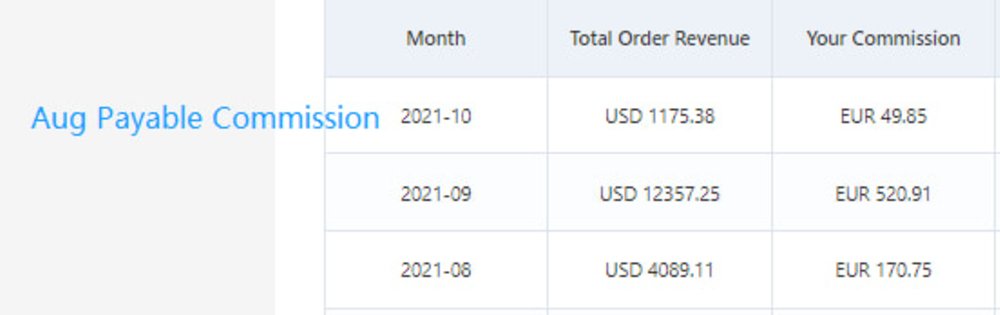
The Monthly Reports dashboard shows you a detailed view of the total order revenue and your commission.
The comprehensive weekly and monthly reports provide a comprehensive overview of your affiliate's activity with Klook. You can view trends, graphs, charts, and download all data for free.
What can you do if you think that the performance is inaccurate?
If you think that the numbers in your dashboard are inaccurate, you can reach out to us via email at affiliate@klook.com or talk to your account manager.
The Klook Affiliate Portal is a platform that uses advanced software and data analytics to analyze performance, track commission, and compare referral traffic. Fortunately, this marketing strategy is efficient and profitable. If you can gather a significant number of visitors and bookings, you will easily receive a great deal of commissions.
So, if you’d like to increase your income, or if you’d want to learn more about affiliate marketing, you should check out the Klook Affiliate program.
If you want to know more about how we can increase your earnings, please check out our guide to marketing and developing a successful affiliate campaign.