How can we help you?
Browse popular FAQs
[In-app activation] How can I activate the eSIM on iOS devices?
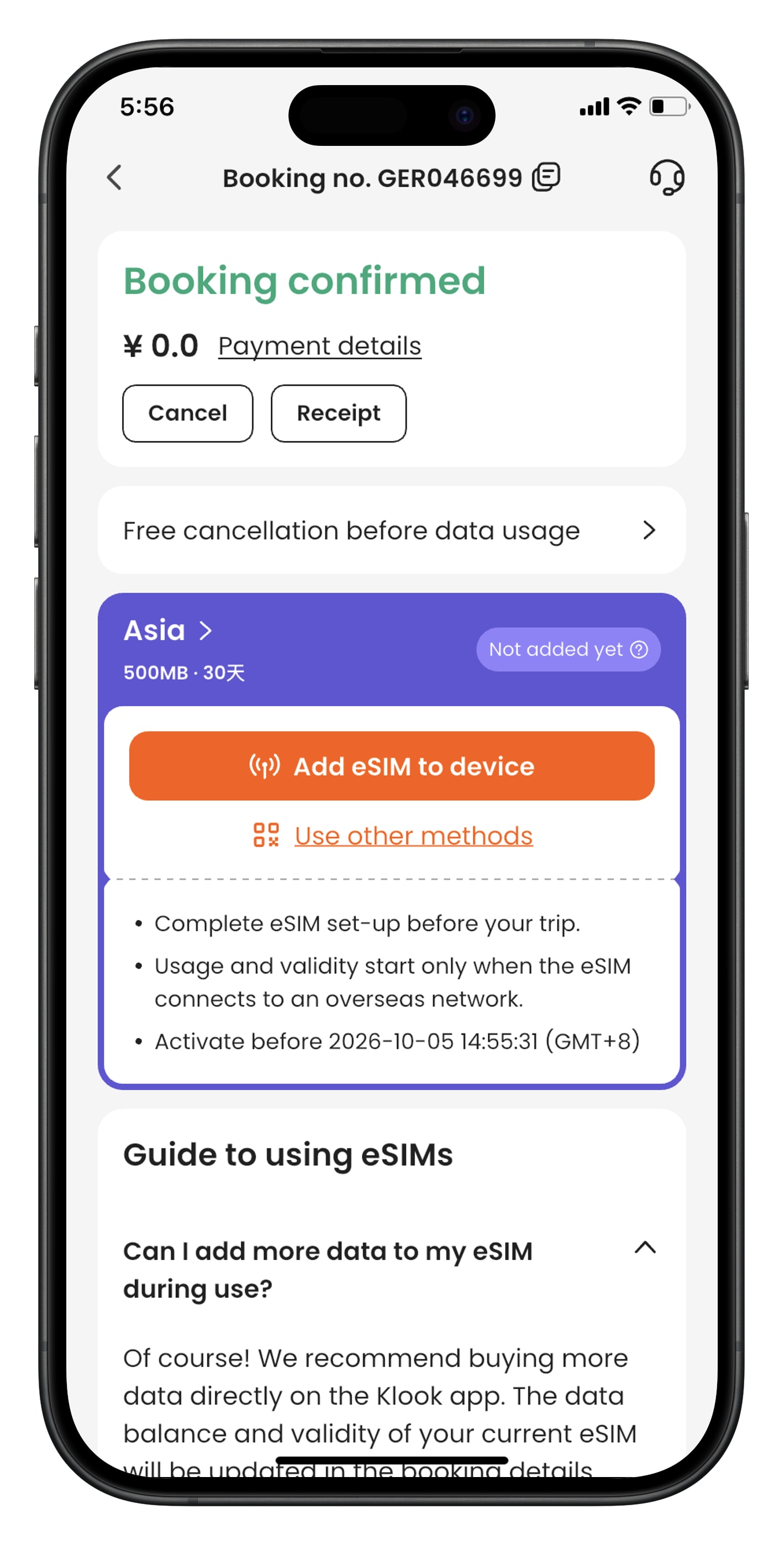
- Step 1. Open the Klook app. Go to Account > Bookings to find your voucher. Select “Use other methods” to see your QR code.
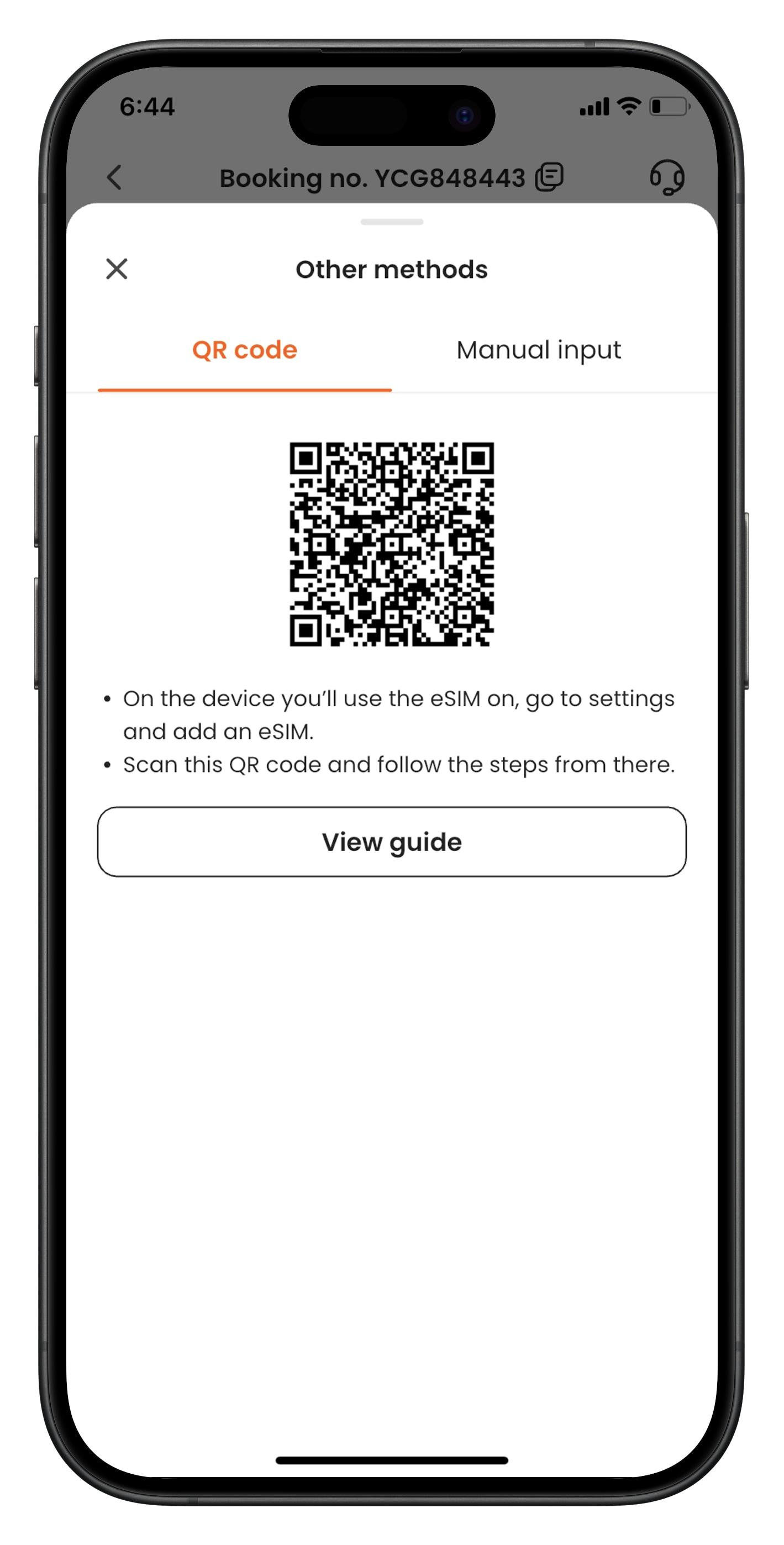
- Step 2. From the device that you’d like to use the eSIM, go to Settings > Cellular > SIMs. Tap “Add eSIM” and “Use QR Code”, and scan the QR code.
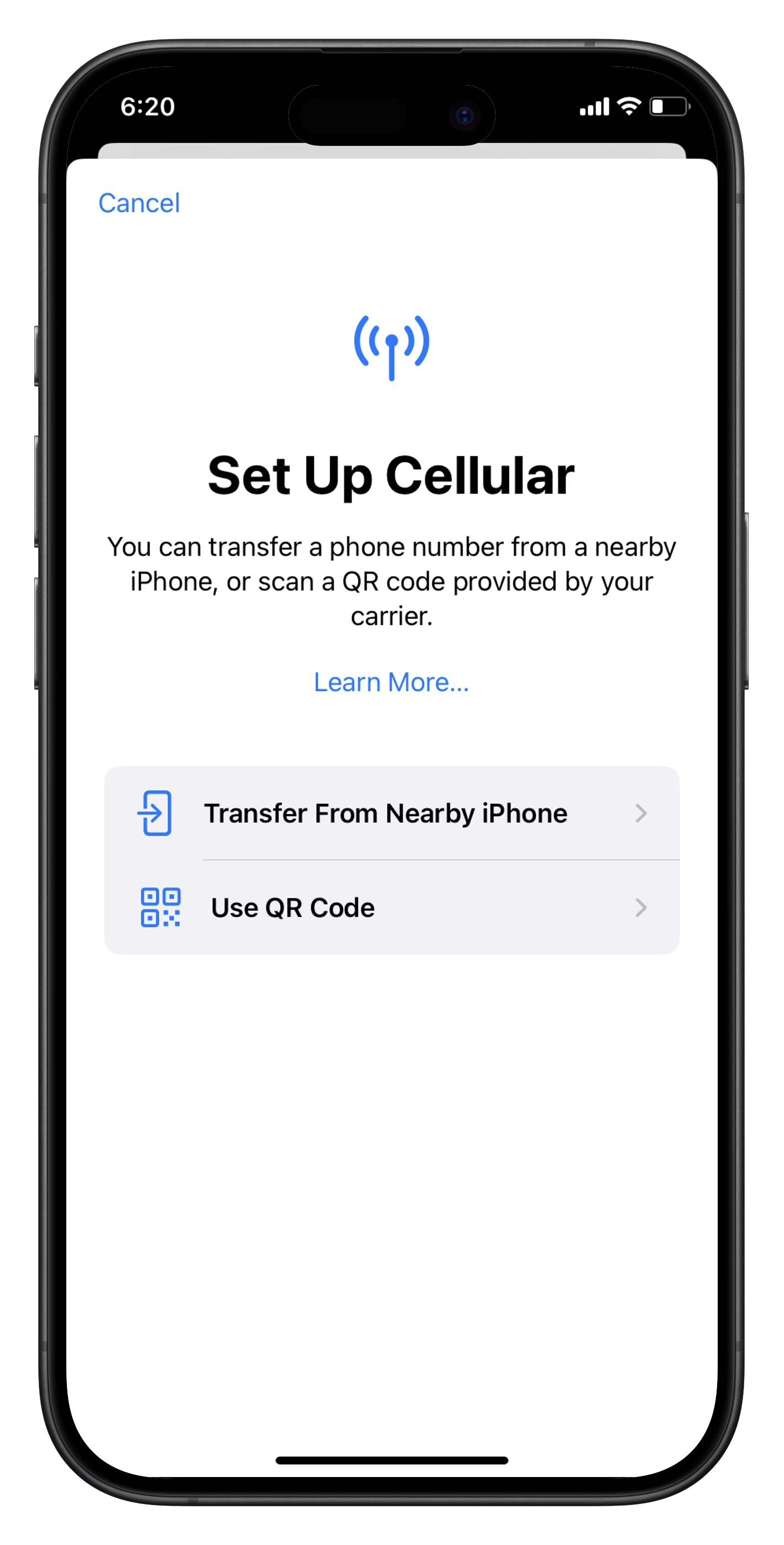
- Step 3. Activate the eSIM on a stable connection. Please do not leave the page while the eSIM is being activated.
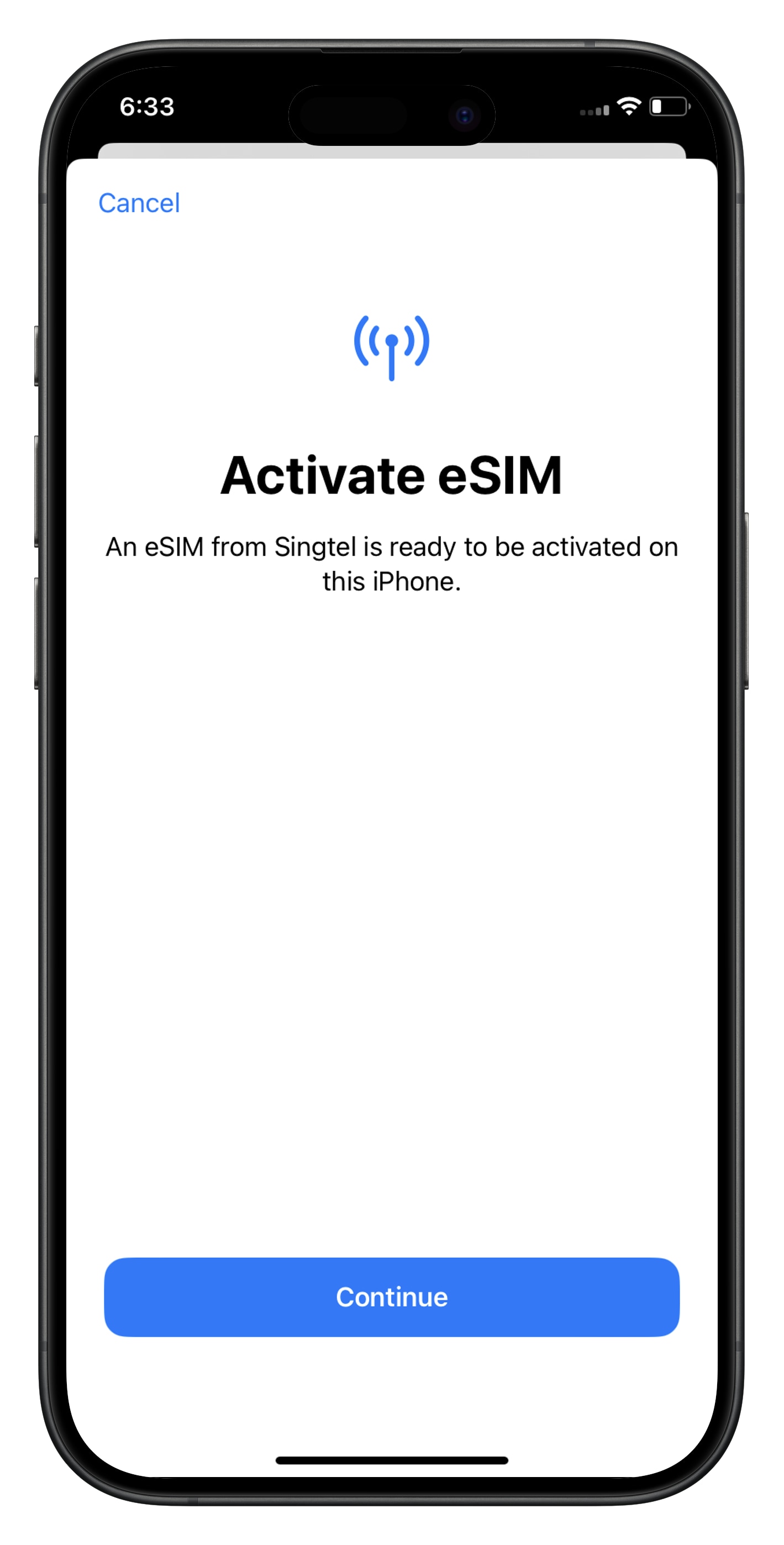
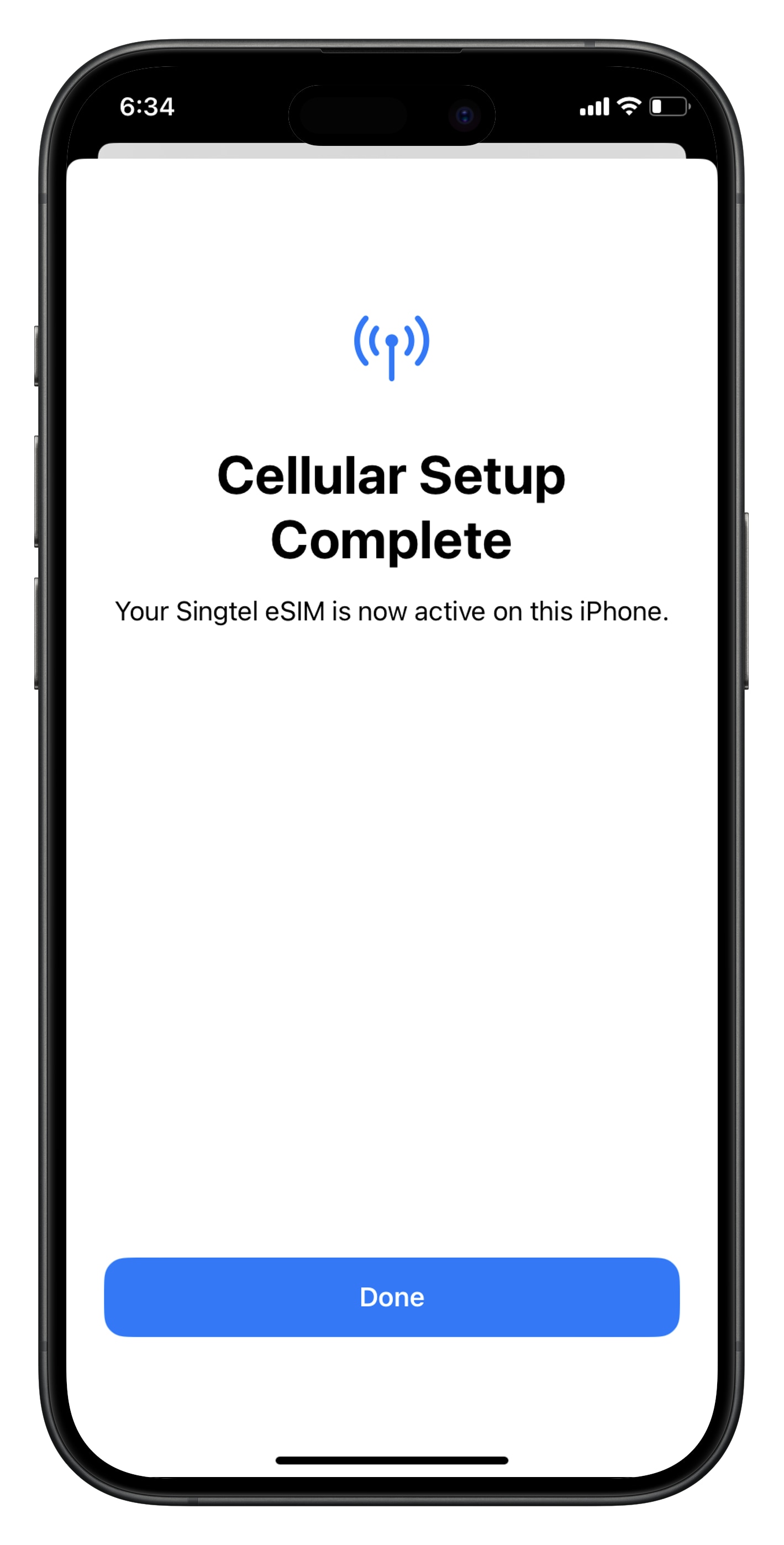
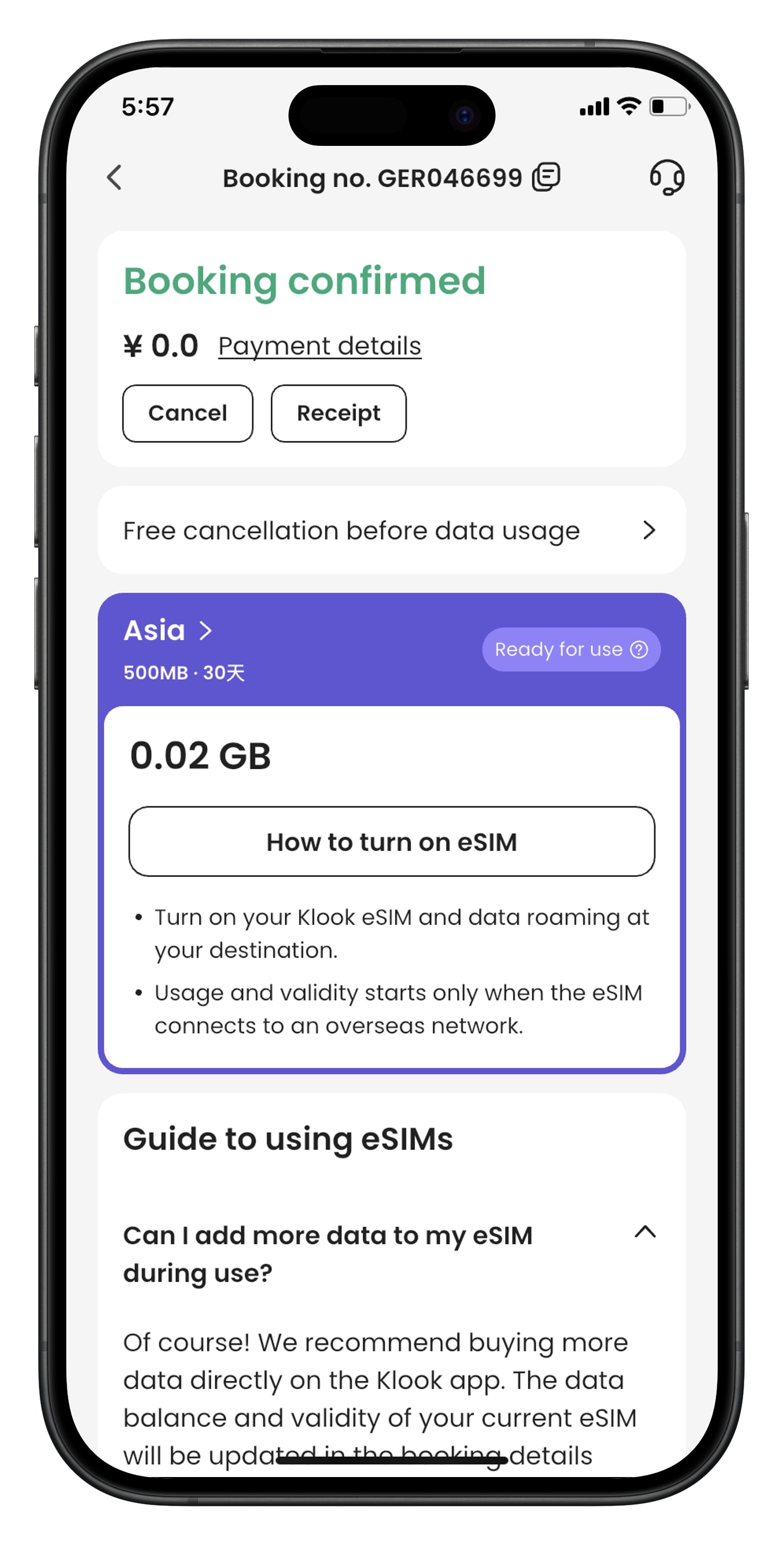
- Step 4. Check the eSIM status in your Klook booking. Tap the icon on the top right corner to get help with any issues. Please note that checking the data balance on the app is enabled only for the “Data in total” packages.
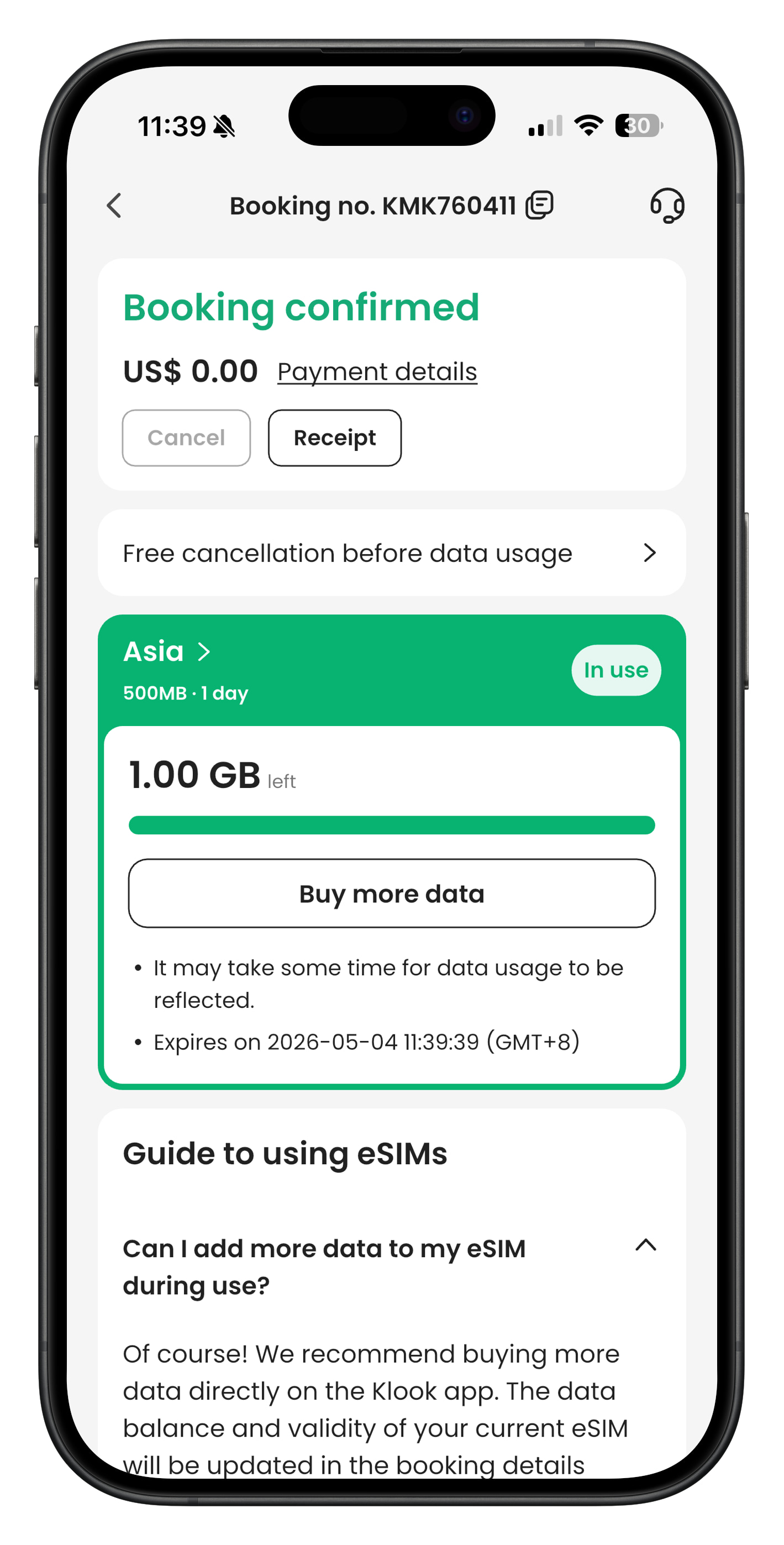
How can I connect to the internet after installing Klook eSIM?
Once your Klook eSIM is installed, follow the steps below to connect to a network. Menu names may vary slightly depending on your device.
1. Select your Klook eSIM
- Go to Settings.
- Tap Mobile, SIM Card Management, or Cellular.
- Check if the Klook eSIM is turned on.
- (For some Android devices) You may also need to turn on an additional eSIM setting from this menu.
2. Turn on Data Roaming For iOS devices:
- Go to Settings > Cellular > SIMs > Data Roaming.
- Turn Data Roaming on for your Klook eSIM.
- To avoid roaming charges, make sure Data Roaming is off for your primary SIM.
For Android devices:
- To avoid unexpected roaming charges, we recommend turning off your primary SIM while using your eSIM. On many Androids, the Data Roaming setting applies to all active SIMs.
🔹 Tip: Menu names and steps may vary depending on your device model and OS version.
When will I receive my booking confirmation?
This depends on the policy of your activity.
- For activities with instant confirmation: You will receive your booking confirmation email within 5 minutes of making your booking.
- For activities without instant confirmation: You will receive your booking confirmation within 24-48 hours of making your booking. Check the package details > Confirmation section of your booking/activity page for the booking confirmation time for your activity.
If you have not received your booking confirmation even after the time mentioned above, please refer to this article.
[In-app activation] How can I activate the eSIM on Android devices?
- Step 1. Open the Klook app. Go to Account > Bookings. Tap the “Activate” button. (You can also scan the QR code on your voucher from Settings > Cellular > SIMs > Tap Add eSIM > scan QR code.)
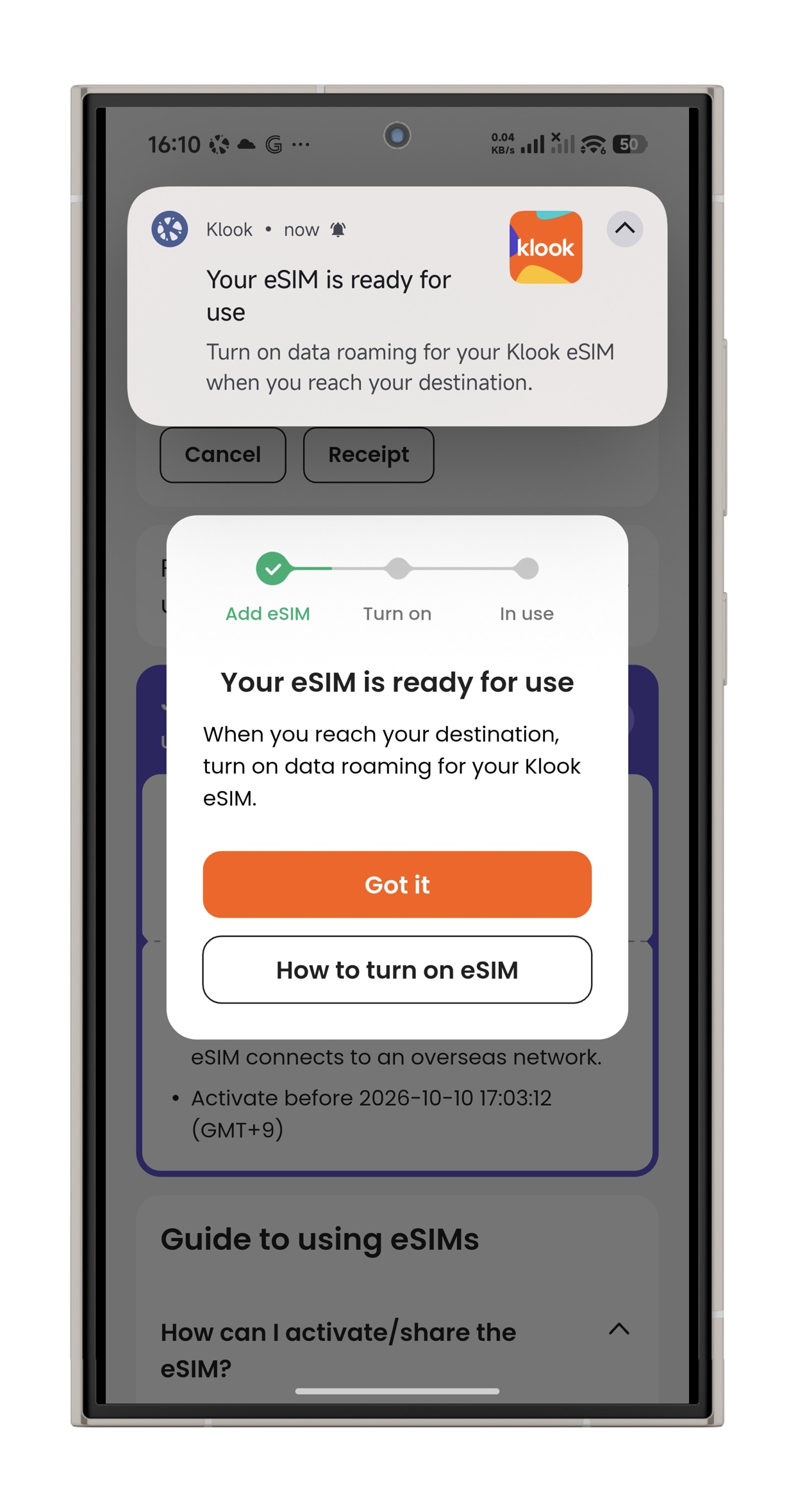
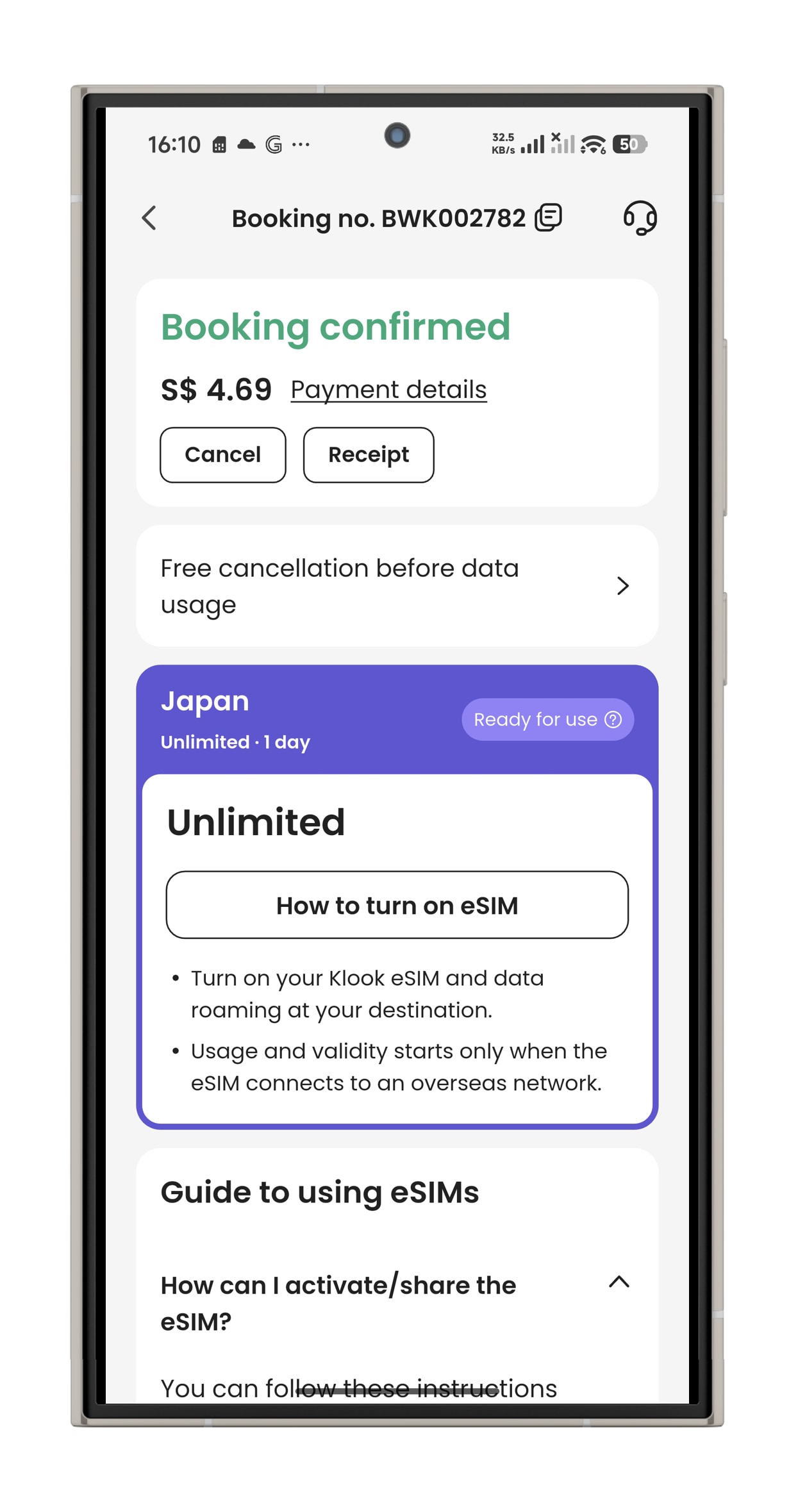
- Step 2. Make sure to read the reminder before activation. Don’t worry - your data usage won’t start immediately upon activation.
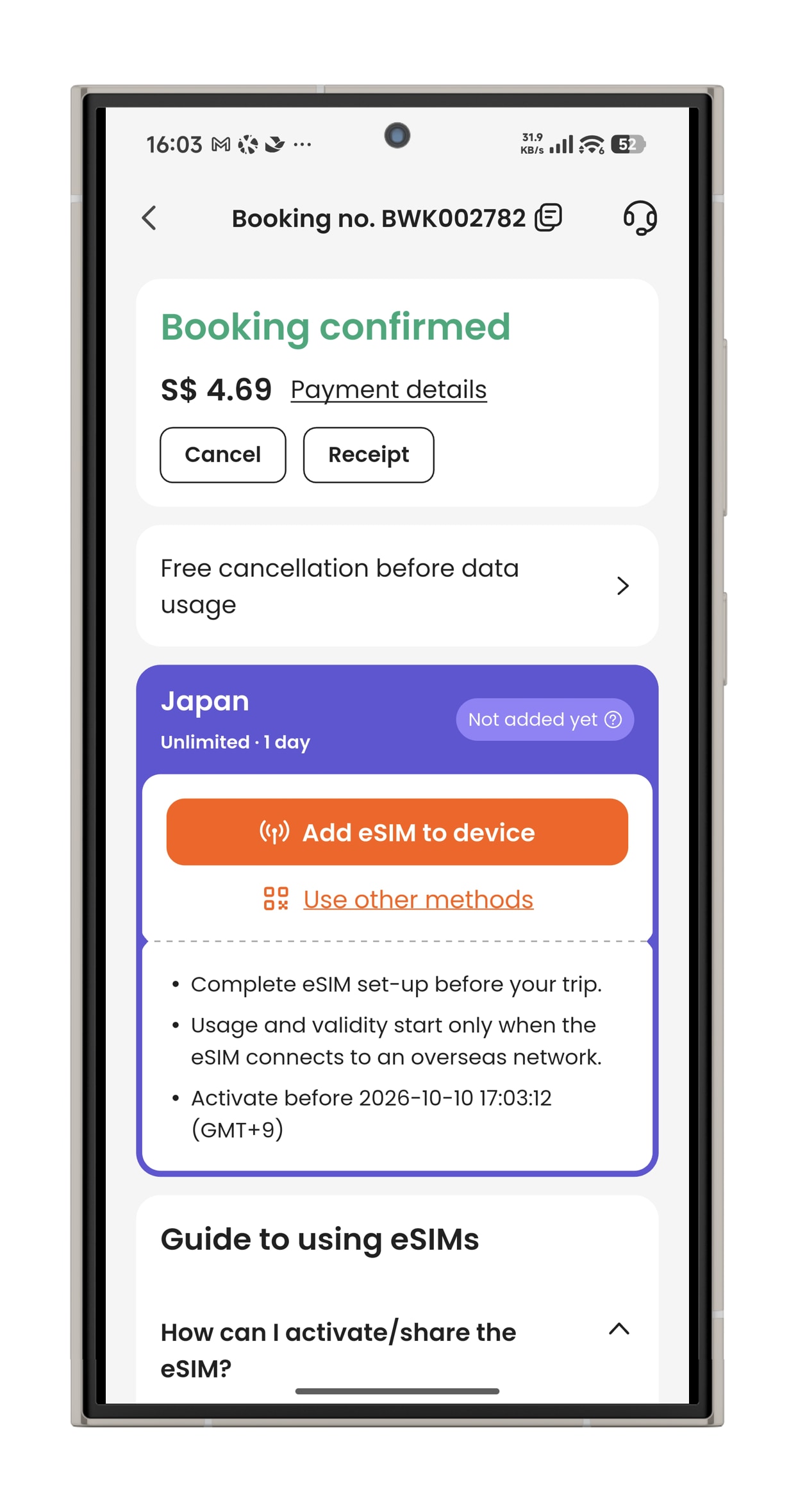
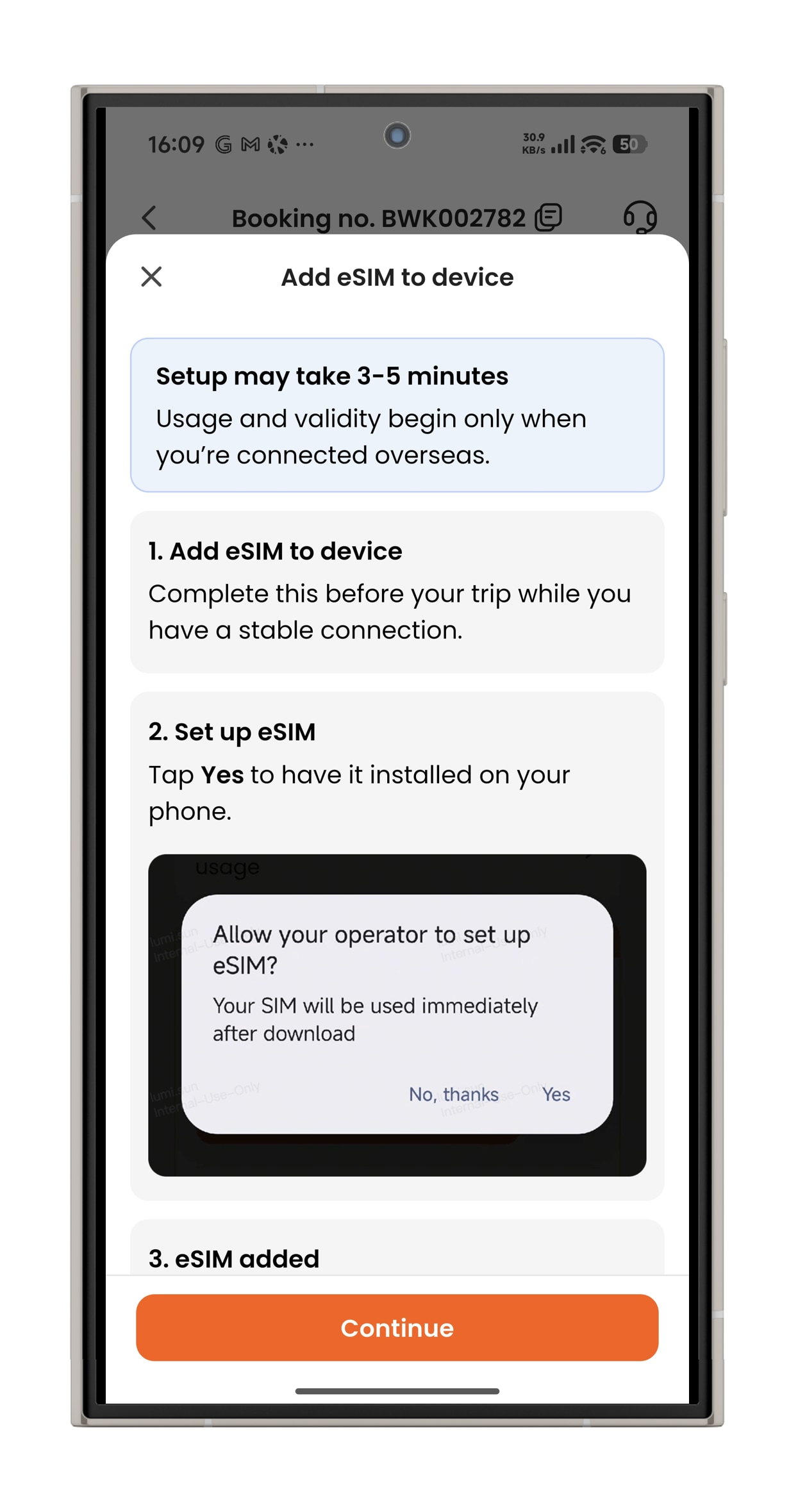
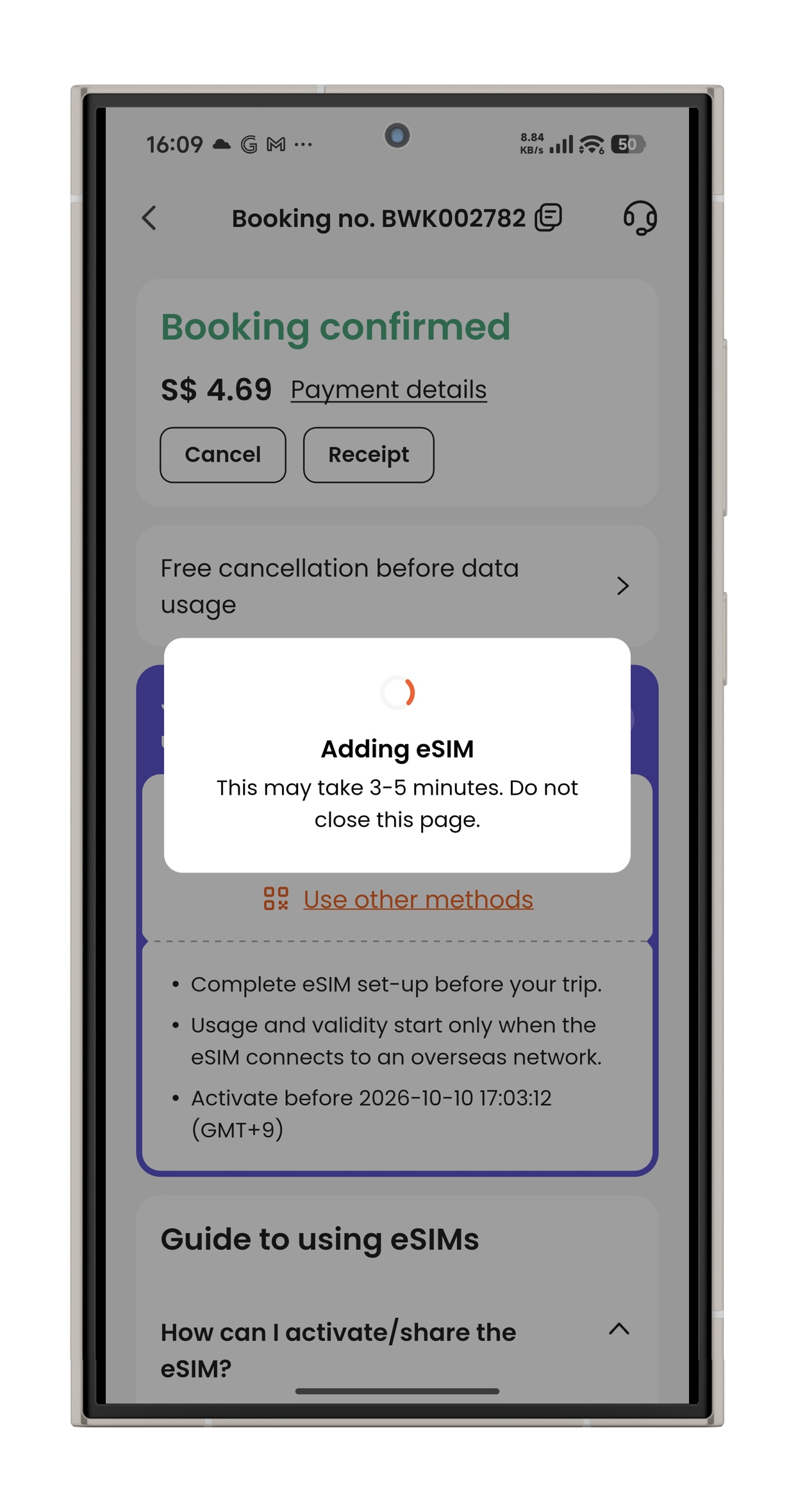
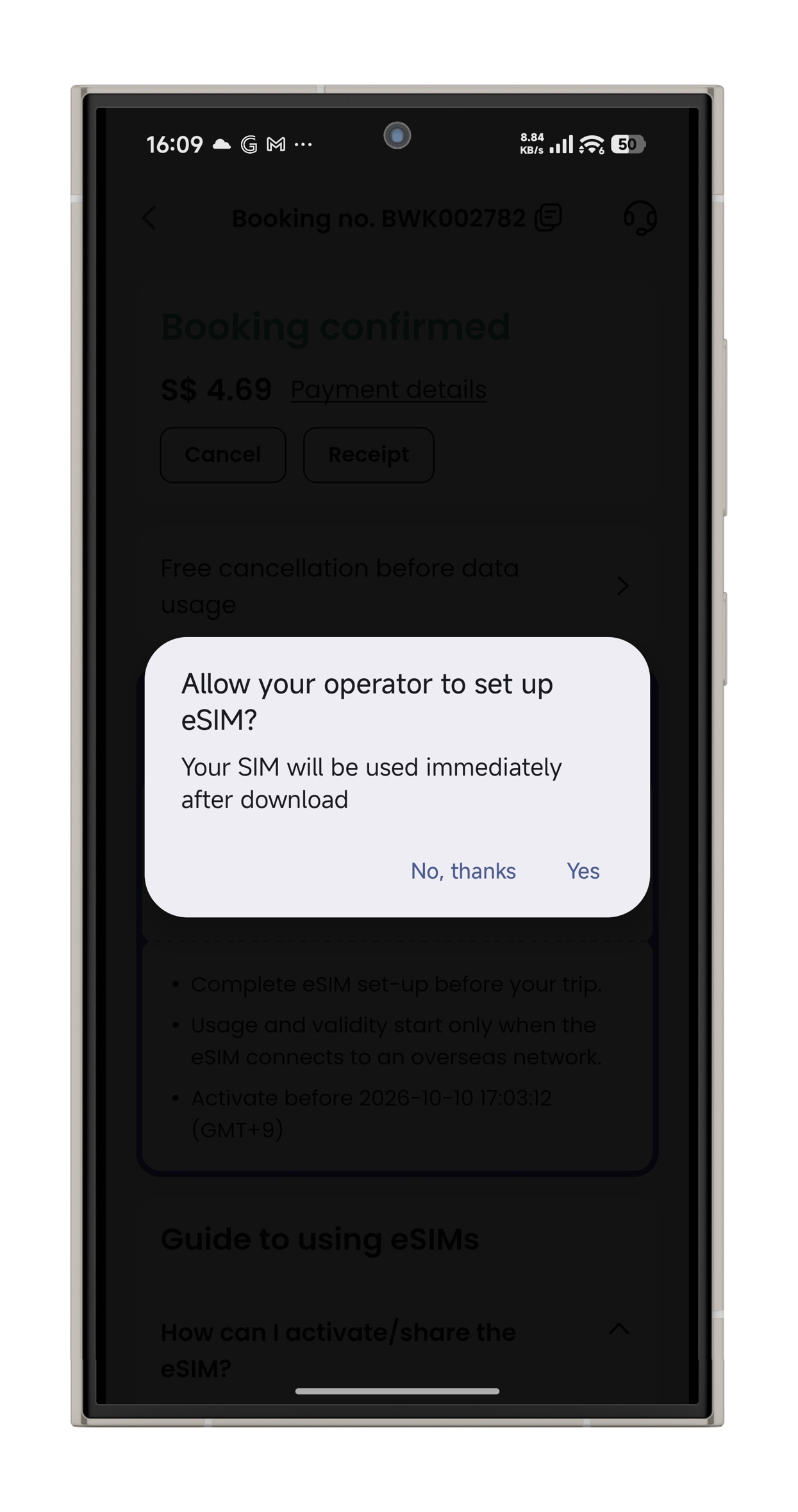
- Step 3. Activate the eSIM on a stable connection, and allow the eSIM to be installed on your device. Please do not leave the page while the eSIM is being activated.
What devices are compatible with eSIM?
How to check if your device is compatible with eSIM
To use an eSIM, your device must meet the following conditions: The device is compatible with eSIMs. The device is not carrier or network-locked. The device is not jailbroken (iOS) or rooted (Android). You can use our list to see if the device you want to use is eSIM-compatible.
Note: Some regional models may not be compatible with eSIMs. Most devices purchased in China and Hong Kong are not compatible with eSIMs. Please check online to confirm if your device is compatible.
The following devices are compatible with eSIMs.
Apple devices:
- iPhone
- iPhone 17/ Pro/ Pro Max
- iPhone Air
- iPhone 16/ 16e/ Plus/ Pro/ Pro Max
- iPhone 15/ Plus/ Pro/ Pro Max
- iPhone 14/ Plus/ Pro/ Pro Max
- iPhone 13/ Mini/ Pro/ Pro Max
- iPhone 12/ Mini/ Pro/ Pro Max
- iPhone 11/ Pro/ Pro Max
- iPhone XS/ XS Max
- iPhone XR
- iPhone SE (2020 and 2022)
- iPad (only iPads that can use 4G data)
- iPad (from 7th generation)
- iPad Air (from 3rd generation)
- iPad Pro, 11-inch (from 1st generation)
- iPad Pro 12.9-inch (from 3rd generation)
- iPad Mini (from 5th generation)
- The following Apple devices are not compatible with eSIM:
- iPhone devices from Mainland China (except iPhone Air).
- iPhone devices from Hong Kong and Macau (except iPhone 13 Mini, iPhone 12 Mini, iPhone SE 2020, and iPhone XS).
- For iPhones and iPads purchased in Turkey:
- Please note that according to Turkey's local regulation, to use roaming data services for 91 days (accumulated) or more per 120 days period, the device's IMEI should be registered with the Central Equipment Identity Register of Turkey. We kindly advise you to contact the CEIR for more information. If you have any questions, please feel free to contact our customer support.
- If you're setting up your device after June 23, 2020, your eSIM will be activated after installation. Contact your carrier if you don't have eSIM enabled.
- For devices set up before June 23, 2020, follow the steps below to activate your eSIM. You must reset your device to complete the following procedure. Make sure to back up your device beforehand.
- Make sure your back up is updated to the latest iOS or iPadOS.
- Tap Settings > General > Transfer or Reset.
- Tap Erase All Content and Settings.
- When asked, enter your passcode or Apple ID password. Then confirm that you want to erase all content.
- After the erase is complete, restore your iPhone or iPad from your backup.
- Once done, set up an eSIM on your device.
Only iPad devices with Wi-Fi + Cellular features are compatible with eSIM.
Samsung devices:
Galaxy A56*
Galaxy A55 5G*
Galaxy A54 5G*
Galaxy A36*
Galaxy A35 5G*
Galaxy A23 5G*
Galaxy XCover7 Pro
Galaxy Z Flip/ 5G/ 3 5G/ 4/ 5/ 6
Galaxy Z Fold/ 2 5G/ 3/ 4/ 5/ 6
Galaxy Note 20/ 5G/ Ultra/ Ultra 5G
Galaxy S20/ 5G/ Ultra/ Ultra 5G
Galaxy S20+/ 5G
Galaxy S21 5G/ Ultra 5G
Galaxy S21+ 5G
Galaxy S22 5G/ Ultra 5G
Galaxy S22+ 5G
Galaxy S23/ 5G/ FE/ S23+/ Ultra
Galaxy S24/ S24+/ Ultra/ FE
Galaxy S25/ Edge/ S25+/ Slim/ Ultra
Galaxy Fold
The following Samsung devices are not compatible with eSIM:
- All Galaxy devices from China, Hong Kong, and Taiwan.
- All Galaxy FE "Fan Edition" models, except the Galaxy S23 FE and S24 FE.
- USA models of the Galaxy S20, S21*, and Note 20 Ultra.
Most Samsung Galaxy devices purchased in South Korea are not compatible with eSIMs, except Galaxy S24, S23, Z Fold 5, Z Fold 4, Z Flip 5, Z Flip 4, and A54 5G variants.
Google Pixel devices:
Pixel 10
Pixel 9/ 9a/ Pro/ Pro XL/ Pro Fold
Pixel 8/ 8a/ Pro
Pixel 7/ 7a/ Pro
Pixel 6/ 6a/ Pro
Pixel 5/ 5a/ 5a 5G
Pixel 4/ 4a/ 4a 5G/ XL
Pixel 3/ 3a/ XL/ 3a XL
Pixel 2/ XL
Pixel Fold
- The following Google Pixel devices are not compatible with eSIM:compatible with eSIM:
Pixel 3 models originating from Australia, Taiwan, and Japan, and those purchased with service from US or Canadian carriers other than Sprint and Google Fi.
Pixel 3a models purchased in South East Asia and with Verizon service.
Hammer devices:
- Explorer PRO
- Blade 3
- Blade 5G
- myPhone NOW eSIM
- myPhone Hammer Construction
- eSIM compatibility can depend on regions. Please contact your carrier or device manufacturer to confirm that your device is compatible with eSIM.
Honor devices:
- HONOR 90
- HONOR 200/ Pro
- HONOR 400/ Lite/ Pro
- Magic7 Pro/ Lite
- Magic6 Pro/ Pro RSR
- Magic Vs3/ V2/ V3
- Magic5 Pro
- Magic4 Pro
- eSIM compatibility can depend on regions. Please contact your carrier or device manufacturer to confirm that your device is compatible with eSIM.
Huawei devices:
P40 / Pro*
Mate 40 Pro
- The following Google Pixel devices are not compatible with eSIM:compatible with eSIM:
Huawei P40 Pro+
All Huawei devices purchased in China
Motorola devices:
- Moto G34/ G35/ G53/ G54/ G54 Power/ G55/ G75/ G85/ G86
- Moto G (2025)/ G (2024)
- Moto G Power (2024)
- Moto G Stylus 5G
- Edge Fusion
- Edge 60/ Pro/ Fusion/ Stylus
- Edge 50 / Fusion/ Pro/ Neo/ Ultra
- Edge 40 Neo/ Pro
- Edge+/ Edge+ (2023)/ Edge+ (2024)
- Edge (2023)/ Edge (2022)
- Razr (2025)
- Razr+ (2025)
- Razr Ultra (2025)
- Razr 40/ 40 Ultra/ 50/ 50 Ultra/ 60
- Razr 2024
- Razr+ 2024
- Razr 2022/ 2019
- Razr 5G
- ThinkPhone 25
- eSIM compatibility can depend on regions. Please contact your carrier or device manufacturer to confirm that your device is compatible with eSIM.
Nokia devices:
- G60
- XR21
- X30
- eSIM compatibility can depend on regions. Please contact your carrier or device manufacturer to confirm that your device is compatible with eSIM.
ONEPLUS devices:
- OnePlus 13/ 13R/ 12/ 11/ Open
- eSIM compatibility can depend on regions. Please contact your carrier or device manufacturer to confirm that your device is compatible with eSIM.
Oppo devices:
- Find N2 Flip
- Find N5
- Find X5/ Pro
- Find X8/ Pro
- Find X3 /Pro
- Reno14/ Pro
- Watch X2 Mini
- eSIM compatibility can depend on regions. Please contact your carrier or device manufacturer to confirm that your device is compatible with eSIM.
RAKUTEN devices:
- Rakuten Big/ Big S
- Rakuten Mini
- Rakuten Hand/ 5G
- eSIM compatibility can depend on regions. Please contact your carrier or device manufacturer to confirm that your device is compatible with eSIM.
SHARP devices:
- AQUOS sense9/ sense8/ sense7/ sense7 plus
- AQUOS R10
- AQUOS R9/ Pro
- AQUOS R8/ pro/ R8s pro
- AQUOS wish
- AQUOS zero6
- eSIM compatibility is only available in Japan and certain regions. Please contact your carrier or device manufacturer to confirm that your device is compatible with eSIM.
SONY devices:
- Xperia 1 IV/ V/ VI/ VII
- Xperia 5 IV/ V
- Xperia 10 III Lite/ IV*/ V/ VI
- eSIM compatibility can depend on regions. Please contact your carrier or device manufacturer to confirm that your device is compatible with eSIM.
- Sony Xperia 10 IV can use eSIMs only in Europe. Please contact your carrier or device manufacturer to confirm that your device is compatible with eSIM.
TCL devices:
- 60/ XE NxtPaper
- 50 5G/ NxtPaper/ Pro NxtPaper
- 40 XL
- eSIM compatibility can depend on regions and carriers. Please contact your carrier or device manufacturer to confirm that your device is compatible with eSIM.
T-Mobile devices:
- Revvl 7/ Pro
- eSIM compatibility can depend on regions and carriers. Please contact your carrier or device manufacturer to confirm that your device is compatible with eSIM.
VIVO devices:
- X200/ Pro/ FE/ X200s
- X100 Pro
- X90 Pro*
- V29 (Europe and Latin America)* / Lite 5G (Europe)*
- V40/ Lite (Europe)*
- V50
- Watch 5
- eSIM compatibility can depend on regions and carriers. Please contact your carrier or device manufacturer to confirm that your device is compatible with eSIM.
Other devices:
- Fairphone 4/ 5
- Gemini PDA 4G+Wi-Fi
- Nothing Phone (3a) Pro
- Nuu Mobile X5
- Realme 14 Pro+
- ASUS Zenfone 12 Ultra
- ZTE nubia Flip2
- alcatel V3 Ultra
- For Surface devices: eSIMs can't be used with any AT&T-locked devices. If your device was purchased through another carrier, the carrier may have disabled eSIM compatibility for Surface Duo.
*WINDOWS 10 or WINDOWS 11 laptops:**
- ACER
- Acer Swift 3/ 7
- Acer TravelMate P2/ Spin P4/ P6
- ASUS
- ASUS Mini Transformer T103HAF
- ASUS NovaGo TP370QL
- ASUS Vivobook Flip 14 TP401NA
- DELL
- Dell Latitude 7440
- Dell Latitude 7210 2-in-1
- Dell Latitude 9410
- Dell Latitude 7310
- Dell Latitude 7410
- Dell Latitude 9510
- Dell Latitude 5410
- Dell Latitude 5411
- Dell Latitude 5511
- HP
- HP Elitebook G5
- HP Probook G5
- HP Zbook G5
- HP Spectre Folio 13
- LENOVO
- ThinkPad X1 Titanium Yoga 2 in 1/ Carbon Gen 9/ Fold/ Nano
- ThinkPad X12 Detachable
- Lenovo Flex 5G
- Lenovo Yoga C630/ 520/ 720 (2-in-1 models)
- Lenovo Miix 630
- SURFACE
Surface Pro 9/Pro X
Surface Go 3
Surface Duo/Duo 2
For Windows 10 devices: Your PC needs to have Windows 10 version 1703 or later for you to use an eSIM. The device also needs to be LTE-ready.
For Surface devices: eSIMs can't be used with any AT&T-locked devices. If your device was purchased through another carrier, the carrier may have disabled eSIM compatibility for Surface Duo.