How can we help you?
Browse popular FAQs
How can I contact Klook's Customer Support?
Here's how you can get in touch with Klook's customer support:
Through the booking detail page
- Click on your profile picture in the top right corner of the screen.
- Click on "Bookings"
- Click on any booking
- Scroll down to the "Need help with this booking?" section.
- Click on "Chat with us".
If you're contacting us regarding an existing booking, please include the following information in your enquiry to help us resolve your problem more quickly.
- Your full name (as stated on your booking)
- Your booking reference ID (which looks like: ABC123456)
- The activity name
- The details of your request
What can I do if I haven't received my booking confirmation email?
Please go through the following steps:
- Check the "Terms & Conditions > Confirmation" on the activity page for the expected confirmation time of your booking
- If you are still within the confirmation window indicated on your package, please give us a bit more time to get your voucher to you.
- If the confirmation time has passed or the package is listed as "Instant confirmation", check your email spam/junk folder in case your spam filter has accidentally caught the booking confirmation email.
- If you are still unable to find your booking confirmation email, get in touch with our customer support agents through your Bookings page > Click on your booking > "Chat with us"
When will I receive my booking confirmation?
This depends on the policy of your activity.
- For activities with instant confirmation: You will receive your booking confirmation email within 5 minutes of making your booking.
- For activities without instant confirmation: You will receive your booking confirmation within 24-48 hours of making your booking. Check the package details > Confirmation section of your booking/activity page for the booking confirmation time for your activity.
If you have not received your booking confirmation even after the time mentioned above, please refer to this article.
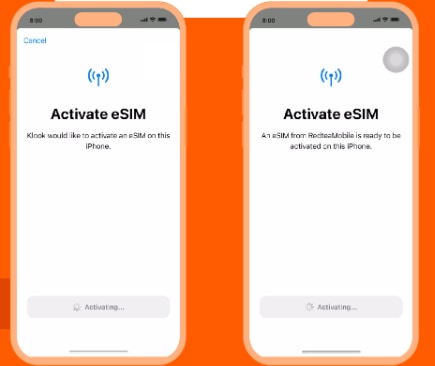
[In-app activation] How can I activate the eSIM on iOS devices?
- Step 1. Open the Klook app. Go to Account > Bookings. Tap the “Activate” button. (You can also scan the QR code on your voucher from Settings > Cellular > SIMs > Tap Add eSIM > scan QR code.)
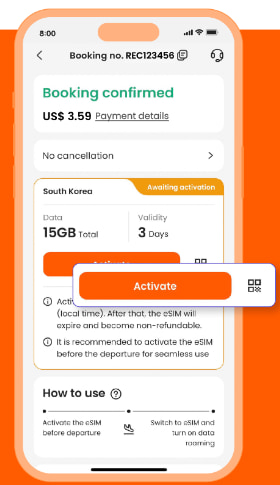
- Step 2. Make sure to read the reminder before activation. Don’t worry - your data usage won’t start immediately upon activation.
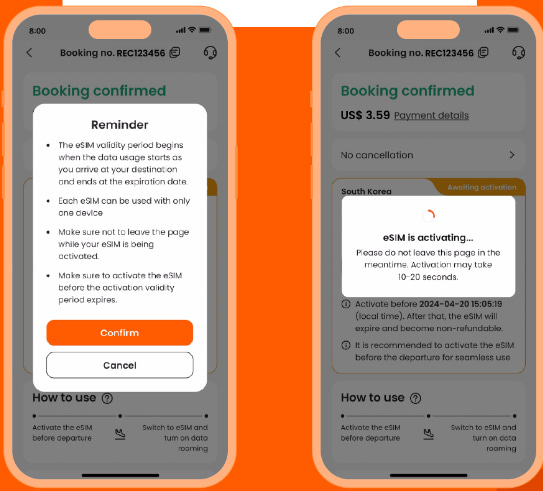
- Step 3. Activate the eSIM on a stable connection. Please do not leave the page while the eSIM is being activated.
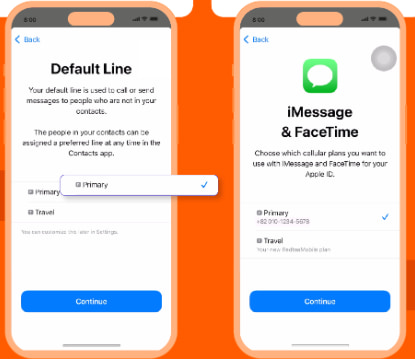
- Step 4 & Step 5. This is to use the eSIM for calling and iMessage right away. Select the “Primary” line before arriving at your destination.
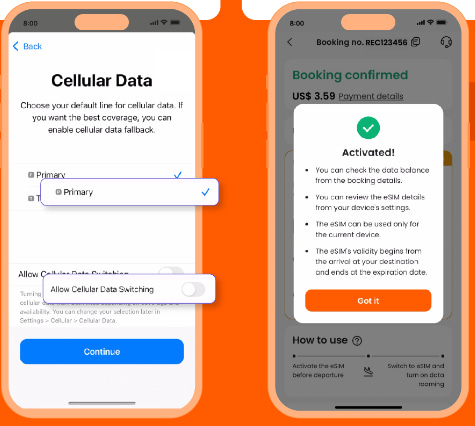
- Step 6 & Step 7. Set the “Primary” line to use cellular data until you arrive at your destination, and toggle off “Allow Cellular Data Switching”. This way, you can ensure the eSIM data won’t be used in advance.
- Step 8. When you arrive at your destination, turn on the eSIM line and turn on data roaming.
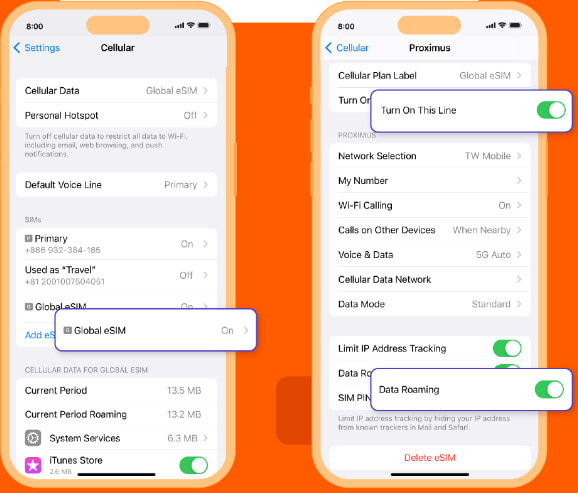
- Step 9. Change the cellular data setting to use your eSIM.
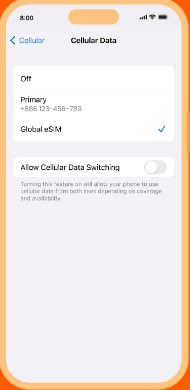
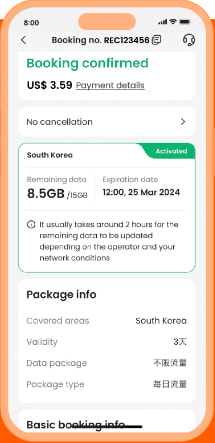
- Step 10. Check the eSIM status in your Klook booking. Tap the icon on the top right corner to get help with any issues. Please note that checking the data balance on the app is enabled only for the “Data in total” packages.
Can I book an activity on behalf of someone else?
Yes. Just be sure to provide their details when finalizing your booking details to make a booking on behalf of your family and friends.
Do note that some Klook vouchers are non-transferrable and can only be used by the person whose details are indicated on the voucher. As such, please make sure that you've keyed in the correct guest details when making your booking.