How can we help you?
Browse popular FAQs
[In-app activation] How can I activate the eSIM on iOS devices?
- Step 1. Open the Klook app. Go to Account > Bookings. Tap the “Activate” button. (You can also scan the QR code on your voucher from Settings > Cellular > SIMs > Tap Add eSIM > scan QR code.)
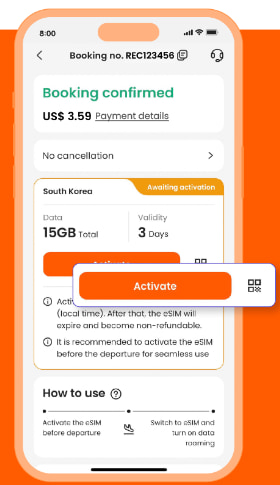
- Step 2. Make sure to read the reminder before activation. Don’t worry - your data usage won’t start immediately upon activation.
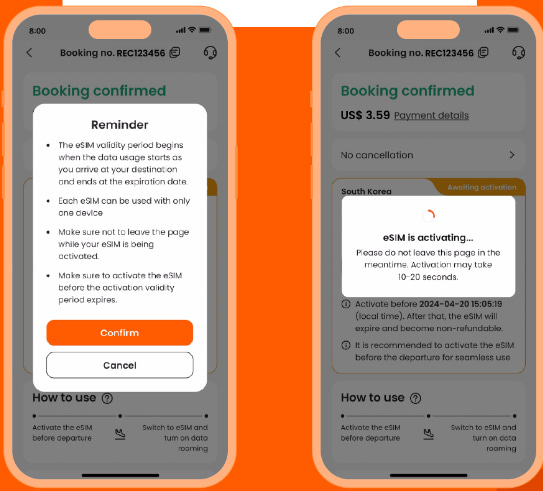
- Step 3. Activate the eSIM on a stable connection. Please do not leave the page while the eSIM is being activated.
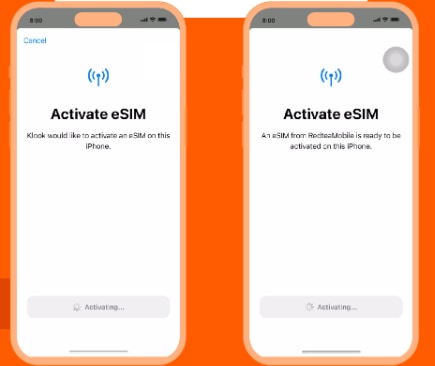
- Step 4 & Step 5. This is to use the eSIM for calling and iMessage right away. Select the “Primary” line before arriving at your destination.
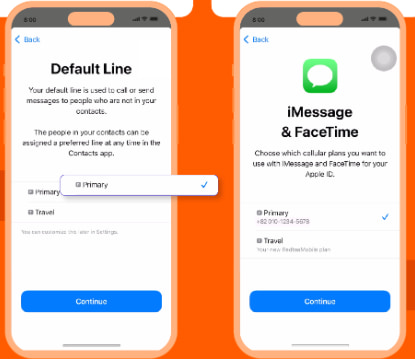
- Step 6 & Step 7. Set the “Primary” line to use cellular data until you arrive at your destination, and toggle off “Allow Cellular Data Switching”. This way, you can ensure the eSIM data won’t be used in advance.
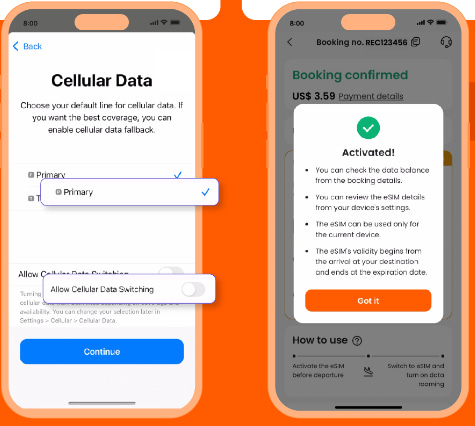
- Step 8. When you arrive at your destination, turn on the eSIM line and turn on data roaming.
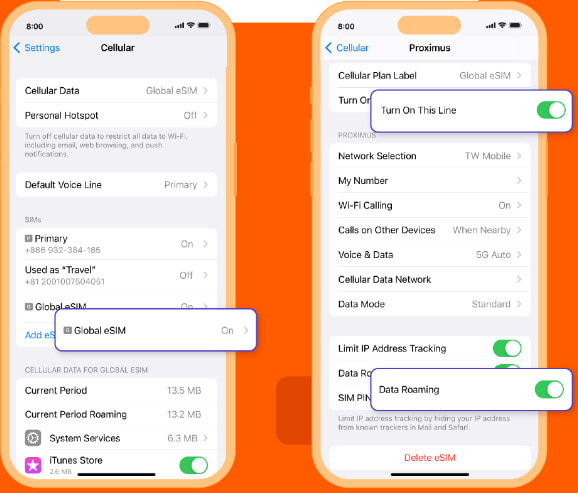
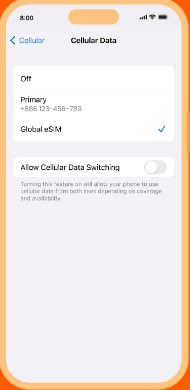
- Step 9. Change the cellular data setting to use your eSIM.
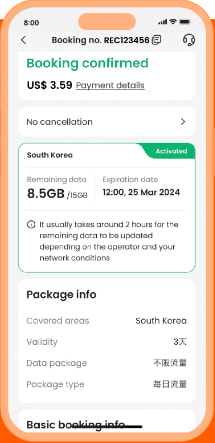
- Step 10. Check the eSIM status in your Klook booking. Tap the icon on the top right corner to get help with any issues. Please note that checking the data balance on the app is enabled only for the “Data in total” packages.
Do I need to create a Klook account before I can book?
You'll need to create a Klook account to book something on Klook activity. You can sign up using your email, phone number, or a third-party account like Facebook, Google, or Apple.
To book an activity on Klook:
- Browse through activities for something that interests you
- Select the packages you'd like to purchase
- Enter your details
- Make your payment
All that's left to do is wait for your booking to be confirmed.
How early after my landing time should I schedule my airport pick up service?
Typically, it is recommended to schedule your pick up 30-40 minutes after your domestic flight landing time if you have check-in luggage, while 20 minutes after would be enough if you only have a carry-on. If you're coming from an international flight, it is recommended to schedule your pick up an hour or 1.5 hours after landing to give enough time for getting through customs. It's also recommended to call your assigned driver once you've landed to inform them that you've arrived so they know to expect you soon.
When will I receive my booking confirmation?
This depends on the policy of your activity.
- For activities with instant confirmation: You will receive your booking confirmation email within 5 minutes of making your booking.
- For activities without instant confirmation: You will receive your booking confirmation within 24-48 hours of making your booking. Check the package details > Confirmation section of your booking/activity page for the booking confirmation time for your activity.
If you have not received your booking confirmation even after the time mentioned above, please refer to this article.
How do I use my KlookCash?
If you have at least 10 KlookCash in your account, you will be able to use your KlookCash.
On your booking check out page, under the "Discount" section, tick the checkbox that says "KlookCash" to apply your KlookCash as a discount on the current price of your booking.
Please note you will not be able to use KlookCash when buying certain products, including but not limited to Klook Passes, e-Gift Cards, Travel Insurances, Stay+ packages and selected events (e.g certain concerts, music festivals, carnivals, exhibitions, sports and marathons). We may also exclude other products at our discretion.