

![[Global] eSIM Compatible Devices](https://res.klook.com/image/upload/q_85/c_fill,w_1360/v1759119278/nfarko448ioytrn96lwm.jpg)
Is your device eSIM compatible?
Goodbye physical SIM cards, hello eSIMs! eSIMs are now one of our top travel essentials. They’re convenient and easy to set up, allowing travelers like you to enjoy internet connection without purchasing a physical SIM card overseas.
But before purchasing an eSIM for your trip, it’s important to check whether your phone is eSIM compatible.
How do I check if my device is eSIM compatible?
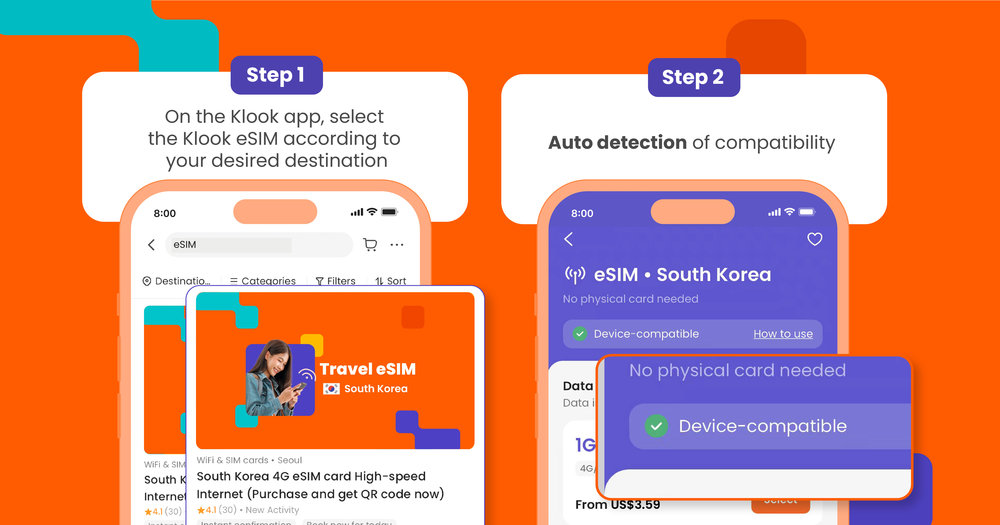
How to check if your device is eSim compatible
When you book via the Klook app (iOS and Android), it’s indicated clearly if your device is eSIM compatible on the eSIM product page. Alternatively, check out the full list of eSIM-compatible devices below.
Note that you can still purchase the product for other people or devices if your device is not compatible with eSIMs!
"I used Klook’s eSIM for my trip to Australia, and it was super convenient. Booking through the app was a breeze, and installation and activation were done in minutes without any hassle. I had reliable data the whole time, and the price was way better than other eSIM options I found. If you want an easy and affordable way to stay connected while traveling, definitely recommend!"
⭐️⭐️⭐️⭐️⭐️ Review by Nicholas (11 Oct 2024)
Which devices are eSIM compatible?
![[Global] Checking eSIM Compatibility with Device](https://res.klook.com/image/upload/fl_lossy.progressive,q_85/c_fill,w_1000/v1716262154/nxl4fltaisa0pk0dm9p9.jpg)
Most iPhone models after the iPhone 11 line are eSIM-compatible. This includes the iPhone 17, iPhone 16, iPhone 15, iPhone 14, iPhone 13, iPhone 12, iPhone XS Max, iPhone XR, and iPhone XS/XR.
Beyond iPhones, several Android models also support eSIM technology. These include Google Pixel devices and the Samsung Galaxy series, as well as phones from Huawei, Motorola, and Oppo.
You can see the full list of eSIM-compatible devices below:
Apple devices
iPhones
All iPhone models from the iPhone XS onwards support eSIM. iPhone 14 and iPhone 15 models manufactured for the US market are eSIM-only, with no physical SIM tray. iPhone 16 and later models support dual eSIM across most markets.
- iPhone XR / XS / XS Max
- iPhone 11 / 11 Pro / 11 Pro Max
- iPhone SE 2 (2020)
- iPhone 12 / 12 Mini / 12 Pro / 12 Pro Max
- iPhone 13 / 13 Mini / 13 Pro / 13 Pro Max
- iPhone SE 3 (2022)
- iPhone 14 / 14 Plus / 14 Pro / 14 Pro Max
- iPhone 15 / 15 Plus / 15 Pro / 15 Pro Max
- iPhone 16 / 16 Plus / 16e / 16 Pro / 16 Pro Max
- iPhone 17 / 17 Pro / 17 Pro Max
- iPhone Air
Note: iPhone devices purchased in China and Hong Kong are not eSIM-compatible. Only the iPhone Air supports eSIM in China.
iPads
- iPad Pro 13" (M4) Wi-Fi + Cellular
- iPad Pro 12.9" (3rd to 6th generation) Wi-Fi + Cellular
- iPad Pro 11" (M4) Wi-Fi + Cellular
- iPad Pro 11" (1st to 4th generation) Wi-Fi + Cellular
- iPad Air 13" (M3) Wi-Fi + Cellular
- iPad Air 11" (M3) Wi-Fi + Cellular
- iPad Air 13" (M2) Wi-Fi + Cellular
- iPad Air 11" (M2) Wi-Fi + Cellular
- iPad Air (3rd to 5th generation) Wi-Fi + Cellular
- iPad (A16) Wi-Fi + Cellular
- iPad (7th to 10th generation) Wi-Fi + Cellular
- iPad mini (A17 Pro) Wi-Fi + Cellular
- iPad mini (5th and 6th generation) Wi-Fi + Cellular
Note: Only iPads that can use 4G data are eSIM compatible.
Samsung Galaxy Z Flip and other Samsung devices
- Samsung Galaxy S20 / S20+ / S20+ 5g / S20 Ultra / S20 Ultra 5G
- Samsung Galaxy S21 / S21+ 5G / S21+ Ultra 5G
- Samsung Galaxy S22 / S22+ / S22 Ultra
- Samsung Galaxy S23 / S23+ / S23 Ultra / S23 FE (China and Hong Kong models don’t support eSIM)
- Samsung Galaxy S24 / S24+ / S24 Ultra
- Samsung Galaxy S25 / S25+ / S25 Ultra / S25 Edge
- Samsung Galaxy S26 / S26+ / S26 Ultra
- Samsung Galaxy Note 20 / Note 20 Ultra 5G
- Samsung Galaxy Fold
- Samsung Galaxy Z Fold2 / Fold3 / Fold4 / Fold5 / Fold6 / Fold 7
- Samsung Galaxy Z Flip / Flip3 / Flip4 / Flip5 / Flip6 / Flip7 / Flip7 FE
- Samsung Galaxy Z TriFold
- Samsung Galaxy A36 5G
- Samsung Galaxy A56 5G
- Samsung Galaxy A55 5G
- Samsung Galaxy A54 (SCG21 (Japanese Model), SC-53D (Japanese Model), SM-A546B/DS (International Model), SM-A546S (Korean Model), SM-A546U1 (International Model))
Note: Some Samsung devices sold in the USA, South Korea, China, and Hong Kong do not support eSIM. China and Hong Kong variants of the S23 series are also excluded. Galaxy FE (Fan Edition) models generally do not support eSIM, except for the S23 FE and Z Flip 7 FE.
Google Pixel devices
- Google Pixel 2 XL
- Google Pixel 3 / 3 XL / 3a / 3a XL
- Google Pixel 4 / 4a / 4 XL
- Google Pixel 5 / 5a
- Google Pixel 6 / 6a / 6 Pro
- Google Pixel 7 / 7a / 7 Pro
- Google Pixel 8 / 8 Pro
- Google Pixel 9 / 9a / 9 Pro / 9 Pro XL / 9 Pro Fold
- Google Pixel 10 / 10 Pro / 10 Pro XL / 10 Pro Fold
- Google Pixel 10a
Note: Some Google Pixel 3 devices purchased in Australia, Japan, Taiwan, and most devices using the US or Canadian carriers are incompatible with eSIM. Google Pixel 3a devices purchased in Japan, Southeast Asia, or from Verizon service are not compatible with eSIM.
Other Android phones
Huawei phones
- Huawei P40 / P40 Pro
- Huawei Mate 40 Pro
- Huawei P50 / P50 Pro
Oppo phones
- Oppo Find X3 Pro / Find N2 Flip
- Oppo Reno 5A
- Oppo Reno 6 Pro 5G
- Oppo Reno 9A
- Oppo Find X5 / Find X5 Pro
- Oppo A55s 5G
eSIM Sony Xperia and other Sony devices
- Xperia 10 III Lite / 10 IV / 10V
- Xperia 1 IV / 1 V
- Xperia 5 IV / 5 V
- Xperia Ace III
Xiaomi phones
- Xiaomi 12T Pro
- Xiaomi 13 / 13 Lite / 13 Pro / 13T Pro
Motorola phones
- Motorola Razr 2019 / 5G / 40 / 40 Ultra
- Motorola Razr+
- Motorola Edge+
- Motorola Edge 40 / 40 Pro / 40 Neo
- Motorola G52J 5G / 5G Ⅱ
- Motorola G53J 5G
- Moto G54 5G
- Motorola G84
Sharp phones
- AQUOS sense4 lite
- AQUOS Sense 6s
- AQUOS sense 7 / 7 plus
- AQUOS wish
- AQUOS wish 2 SHG08
- AQUOS wish 3
- AQUOS zero 6
- Simple Sumaho 6
- AQUOS R7
- AQUOS R8 / R8 Pro
Rakuten phones
- Rakuten Mini
- Rakuten Big-S / Big
- Rakuten Hand / Hand 5G
Honor phones
- Honor Magic 4 Pro
- Honor Magic 5 Pro
- Honor 90
- Honor X8
Vivo devices
- Vivo X90 Pro
- Vivo V29 Lite 5G (Europe)
- Vivo X100 Pro
Nokia devices
- Nokia XR21
- Nokia X30
- Nokia G60 5G
Purchasing an eSIM for your next trip
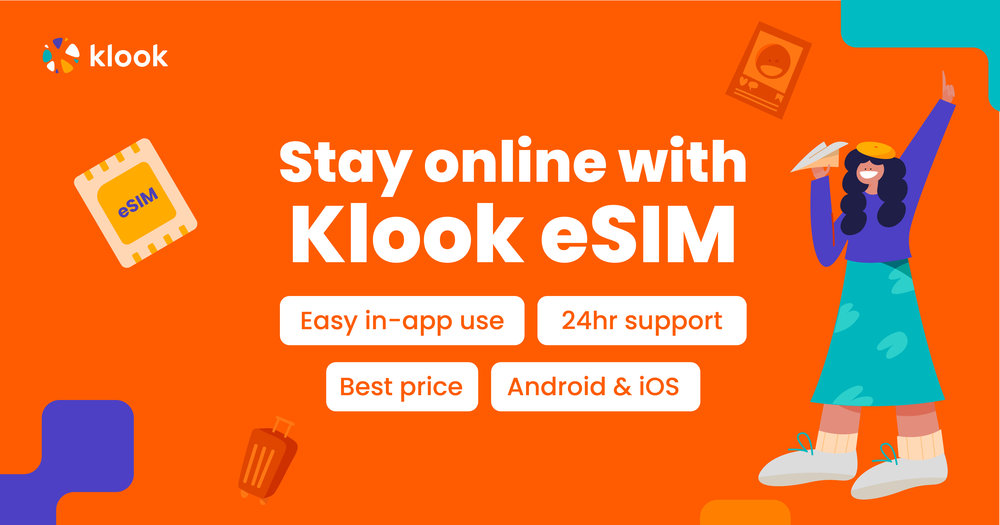
Once you've confirmed your device is on the eSIM supported devices list, you're ready to book! Klook offers affordable high-speed 4G/5G eSIMs for destinations across Asia, Europe, the Americas, and beyond, starting from just USD $0.59.
You can choose between 1 and 30 days of validity and pick the data amount that fits your trip. Activation is quick: scan the QR code from your booking or activate directly through the Klook app. Here are some of the top destinations covered:
Popular Klook eSIMs to book
"The esim is easy to activate through the app and the instructions are easy to follow. I had a stable connection throughout the trip as well within and outside Seoul. It's a plus that it allows mobile hotspot which is very helpful if you're traveling as a group."
⭐️⭐️⭐️⭐️⭐️ Review by Shanee (25 Nov 2024)

FAQs about eSIM-compatible devices
What are the differences between eSIM and traditional SIM cards?
A traditional or physical SIM card is a detachable chip that you place into your device to access a mobile network. In contrast, an eSIM is built directly into the device during production, removing the necessity for a traditional SIM card.
What are the benefits of using an eSIM?
eSIMs offer several advantages! They eliminate the need to swap physical SIM cards, provide the flexibility to switch between carriers effortlessly, and allow for quick setup and activation.
How many eSIMs can I have on my device?
Most iOS devices can store 8 or more eSIM profiles, though only one or two can be active at a time. The iPhone XR through the iPhone 13 series support one active eSIM alongside one physical SIM. iPhone 14 and 15 models made for the US market are eSIM-only and can run two eSIMs simultaneously. iPhone 16 and later support dual eSIM across most markets globally.
Android devices vary more by brand. Most support between 5 and 8 stored eSIM profiles, but typically only one can be active at a time, though you can pair an active eSIM with a physical SIM in the second slot. Check your specific model's settings for the exact limit.
How do I activate my eSIM?
After purchasing your eSIM on Klook, it only takes a few steps to install and activate it.
1. Find your purchased eSIM order under “My Orders”
2. Before your trip, install the eSIM by scanning a QR code provided in the booking details OR activate it directly on the Klook app
3. When you arrive at your destination, head to your phone settings and switch to your eSIM. The eSIM is only activated after you connect to the local network.
The eSIM is valid for your selected duration after activation on a 24-hour basis. For example, if you purchased a 3-day eSIM and activated it on 1 Oct at 9 PM, it will be valid until 4 Oct 9 PM.
Why can't I activate my eSIM?
Please follow the steps in our eSIM activation guide to complete the installation. You can also refer to the eSIM usage problems list to check if you are encountering issues with the setup.
How do I know if my phone is eSIM compatible?
If you're booking through the Klook app, it will flag compatibility automatically on the eSIM product page. You can also check your settings for an "Add eSIM" or "Add a plan" option under your mobile/cellular menu or dial *#06# to see if an EID number appears. When in doubt, refer to your device manufacturer's website for a confirmed eSIM-supported devices list.
Which iPhones are eSIM compatible?
All iPhone models from the iPhone XS onwards support eSIM: that's the iPhone XR, XS, XS Max, and every model released since, through to the iPhone 17 lineup. The main exception is iPhones purchased in mainland China and Hong Kong, which don't support eSIM (except for the iPhone Air in China).
For iPhone eSIM compatibility on the 14 and 15 series made for the US market, these are eSIM-only with no physical SIM slot at all.
Do all Samsung Galaxy phones support eSIM?
Not all of them. Samsung's eSIM support starts from the Galaxy S20 series for flagship phones and the Galaxy Z Fold and Z Flip foldable lines. Budget and mid-range models generally don't support eSIM unless specifically listed.
Some regional variants, particularly devices sold in China, Hong Kong, South Korea, and parts of the US, may also lack eSIM even in models that otherwise support it. Always check the specific variant code if you're unsure.
Can I use eSIM on a tablet or laptop?
Yes, though support is more limited than on smartphones. For tablets, Apple iPads with Wi-Fi + Cellular capability support eSIM from the iPad Pro 3rd generation onwards, as well as newer iPad Air and iPad mini models.
Does my phone need to be unlocked to use an eSIM?
Yes. Even if your phone is on the eSIM compatible devices list, a carrier-locked device won't be able to activate a third-party eSIM. If your phone was purchased through a mobile plan or on contract, contact your carrier to check whether it's locked and request an unlock if needed. Most carriers will unlock your device once the contract period ends or sometimes upon request.
Looking for inspiration for your next getaway?




What is Klook?
Klook is a leading pan-regional experiences platform in Asia Pacific, purpose built to digitalize experiences and make them accessible to every traveler.
Our mission is to build the digital infrastructure for the global experience economy — empowering merchants to share their passions and travelers to discover the heartbeat of each destination. We operate a mobile-first, curated platform featuring diverse experiences across global destinations.